7 Powerful Controls to Stop OAuth Abuse Fast
Consent phishing & OAuth app abuse: an engineering playbook for Google Workspace + Microsoft 365
OAuth abuse has become one of the fastest ways for attackers to get persistent access while bypassing passwords and MFA. In a consent phishing attack, the user doesn’t “log in to the attacker”—they approve a legit-looking app consent that silently grants API access, long-lived refresh tokens, and sometimes mailbox-level capabilities.
If you’re an engineering leader, treat this as an identity + telemetry + controls problem—because “more training” won’t fix an authorization layer that’s too permissive by default.
This playbook gives you:
- A threat model for consent phishing & OAuth app abuse
- Hardening patterns for Microsoft 365 and Google Workspace
- Detection signals + runnable code to hunt and alert
- An incident runbook: revoke tokens, remove apps, retro-hunt, preserve evidence
- What to retain for SOC 2 / ISO 27001 evidence packages
To implement this with a developer-first approach (policy + detection + validation), start here: https://www.pentesttesting.com/digital-forensic-analysis-services/
Want faster incident investigations? Read Forensics-Ready SaaS Logging: Audit Trails That Actually Help During Incidents: https://www.cybersrely.com/forensics-ready-saas-logging-audit-trails/
Threat model: how “legit app consent” becomes persistent access
The attacker’s winning path (typical)
- Victim receives a convincing “SharePoint/Docs/HR/Invoice” prompt
- Victim clicks Accept on an OAuth consent screen
- Attacker gets:
- delegated scopes (sometimes extremely broad)
- refresh tokens (persistence)
- ongoing API access to mail/files/calendar/users depending on scopes
Why MFA doesn’t save you
MFA protects interactive sign-in, but OAuth abuse often shifts the “battle” to:
- consent grants
- app permissions
- refresh token behavior
- mailbox rules + auto-forwarding
This is why DFIR investigations for modern account takeovers frequently include mailbox rules and OAuth misuse—and why you should keep DFIR-ready evidence.
Control 1) Force an admin consent workflow (stop “drive-by” consent)
Your first goal: remove “user consent = OK” as a default behavior.
Microsoft 365 (Entra ID)
Target outcome: users cannot grant risky scopes to random apps. Require admin approval.
Engineering checklist
- Restrict user consent to low-risk permissions only
- Require admin approval for high-impact scopes (mail, files, directory)
- Prefer apps from verified publishers and/or pre-approved allowlists
Google Workspace
Target outcome: block untrusted third-party apps; only allow trusted/whitelisted OAuth clients.
Engineering checklist
- Enforce App Access Control with allowlisting
- Limit access to high-risk Google APIs unless explicitly needed
- Restrict domain-wide delegation approvals
Tip: start by classifying scopes into “green/yellow/red” buckets, then turn that into policy + approvals.
Control 2) App allowlists + publisher trust (reduce your OAuth blast radius)
OAuth abuse thrives in high-choice environments (“any app can request anything”).
Minimal viable allowlist model
- Only allow:
- known vendors
- internal apps
- apps with business owner + ticketed approval
- Block:
- unknown publishers
- newly created apps with broad scopes
- apps requesting mail + offline access without a strong justification
Operational rule: every allowlist entry must have:
- owner (team)
- approved scopes
- approval date + expiry/renewal
- evidence link (ticket/PR)
Control 3) Least-privileged scopes (make OAuth abuse less valuable)
OAuth abuse becomes catastrophic when apps get:
- mail read/write
- mail send
- file read/write across tenants
- directory read (org intel)
- offline access (persistence)
Scope-risk rubric (simple)
- Red: Mail., Files. (tenant-wide), Directory.*
- Yellow: User profile basics, read-only narrow scopes
- Green: app-specific, minimal, time-bound, non-exportable
Engineering policy: “No red scopes without admin approval + detection coverage.”
Control 4) Detection: alert on new grants + risky scopes + refresh-token weirdness
You want telemetry that answers:
- Who granted what, to which app, when?
- Which scopes are high-risk?
- Are tokens being used from unusual locations/apps?
- Did mailbox rules or forwarding spike right after consent?
Microsoft 365: list delegated consent grants (Graph) + flag risky scopes
# 1) Get a Graph access token (example using Azure CLI)
az account get-access-token --resource https://graph.microsoft.com \
  --query accessToken -o tsv > token.txt

TOKEN="$(cat token.txt)"

# 2) Pull OAuth2 permission grants (delegated)
curl -sS -H "Authorization: Bearer $TOKEN" \
  "https://graph.microsoft.com/v1.0/oauth2PermissionGrants?\$top=999" \
  | jq '.value[] | {id, clientId, principalId, resourceId, scope, consentType}'
Risky scope filter (quick triage)
curl -sS -H "Authorization: Bearer $TOKEN" \
  "https://graph.microsoft.com/v1.0/oauth2PermissionGrants?\$top=999" \
| jq -r '
  .value[]
  | select(.scope|test("offline_access|Mail\\.|Files\\.|Directory\\.";"i"))
  | "\(.id)\t\(.clientId)\t\(.consentType)\t\(.scope)"
Microsoft Sentinel / Log Analytics (KQL): detect consent events
AuditLogs
| where TimeGenerated > ago(7d)
| where OperationName has_any ("Consent", "Add OAuth2PermissionGrant", "Add delegated permission grant")
| project TimeGenerated, OperationName, InitiatedBy, TargetResources, Result
| order by TimeGenerated desc
Exchange Online: hunt suspicious mailbox rules / forwarding (PowerShell)
Connect-ExchangeOnline

# Find inbox rules with forwarding / redirect behaviors
Get-Mailbox -ResultSize Unlimited | ForEach-Object {
  $mbx = $_.UserPrincipalName
  Get-InboxRule -Mailbox $mbx | Where-Object {
    $_.ForwardTo -or $_.RedirectTo -or $_.ForwardAsAttachmentTo
  } | Select-Object @{n="Mailbox";e={$mbx}}, Name, Enabled, ForwardTo, RedirectTo, ForwardAsAttachmentTo
}

# Find mailbox-level forwarding settings
Get-Mailbox -ResultSize Unlimited | Where-Object {
  $_.ForwardingSmtpAddress -or $_.DeliverToMailboxAndForward
} | Select-Object DisplayName, UserPrincipalName, ForwardingSmtpAddress, DeliverToMailboxAndForward
If you want a DFIR-led validation that focuses on OAuth misuse + mailbox persistence patterns:
https://www.pentesttesting.com/digital-forensic-analysis-services/
Control 5) Google Workspace OAuth audit: export daily and diff
A practical engineering pattern is: export daily, diff against yesterday, alert on new OAuth clients/scopes.
Python: fetch Google “token” activity and flag suspicious events
"""
Requires:
  pip install google-api-python-client google-auth

Auth options:
- Service account with domain-wide delegation (recommended for org-wide audit),
  or OAuth client for admin user.

Set:
  DELEGATED_ADMIN = "[email protected]"
"""
from datetime import datetime, timedelta, timezone
from googleapiclient.discovery import build
from google.oauth2 import service_account
import json
import re

SCOPES = ["https://www.googleapis.com/auth/admin.reports.audit.readonly"]
KEYFILE = "service-account.json"
DELEGATED_ADMIN = "[email protected]"

def build_reports():
    creds = service_account.Credentials.from_service_account_file(KEYFILE, scopes=SCOPES)
    delegated = creds.with_subject(DELEGATED_ADMIN)
    return build("admin", "reports_v1", credentials=delegated, cache_discovery=False)

def list_token_events(start_time_iso):
    svc = build_reports()
    req = svc.activities().list(
        userKey="all",
        applicationName="token",
        startTime=start_time_iso,
        maxResults=1000,
    )
    events = []
    while req is not None:
        resp = req.execute()
        events.extend(resp.get("items", []))
        req = svc.activities().list_next(req, resp)
    return events

RISK_PATTERNS = re.compile(r"(mail|gmail|drive|admin|offline)", re.I)

if __name__ == "__main__":
    start = (datetime.now(timezone.utc) - timedelta(days=1)).isoformat()
    items = list_token_events(start)

    flagged = []
    for e in items:
        name = e.get("events", [{}])[0].get("name", "")
        params = e.get("events", [{}])[0].get("parameters", [])
        blob = json.dumps({"name": name, "params": params})
        if RISK_PATTERNS.search(blob):
            flagged.append({"time": e.get("id", {}).get("time"), "actor": e.get("actor", {}), "event": name})

    print(json.dumps({"start": start, "total": len(items), "flagged": flagged[:50]}, indent=2))
What to alert on
- New OAuth client authorizations
- Token grants involving high-risk APIs
- Sudden spike in token events for a single user
- Events clustered right after a phishing email campaign
Control 6) Incident runbook: revoke tokens, remove grants, retro-hunt
When OAuth abuse is suspected, the order matters: contain first, then clean up, then hunt.
Step A — Identify the malicious app and affected users
- List recent consent grants
- Correlate with sign-in anomalies
- Check mailbox rules/forwarding changes
Step B — Remove consent grants (Graph) and disable the service principal if needed
# Remove a delegated permission grant by ID
GRANT_ID="00000000-0000-0000-0000-000000000000"

curl -sS -X DELETE -H "Authorization: Bearer $TOKEN" \
  "https://graph.microsoft.com/v1.0/oauth2PermissionGrants/$GRANT_ID"
Step C — Revoke user sessions (force re-auth)
USER_ID="[email protected]"

curl -sS -X POST -H "Authorization: Bearer $TOKEN" \
  -H "Content-Type: application/json" \
  "https://graph.microsoft.com/v1.0/users/$USER_ID/revokeSignInSessions" \
  -d '{}'
Step D — Rotate credentials and review “persistence hooks”
- Reset password for affected users (especially privileged)
- Rotate any app secrets/certs tied to the malicious app
- Remove suspicious mailbox rules and forwarding
- Update allowlist/consent policies to prevent repeat
Step E — Retro hunt (minimum set)
- 30–90 day lookback: new consents, risky scopes, token activity spikes
- Mailbox rules, forwarding, hidden inbox rules
- File access/download spikes post-consent
If you need a formal investigation pack (timeline + evidence preservation) that explicitly covers OAuth misuse + mailbox rule persistence:
https://www.pentesttesting.com/digital-forensic-analysis-services/
Control 7) Compliance mapping: what evidence to retain (SOC 2 / ISO 27001)
Auditors don’t want “we think we fixed it.” They want proof.
Keep these artifacts (exportable, repeatable)
- OAuth policy configuration snapshot (before/after)
- Allowlist entries (owner + approved scopes + approval record)
- Audit log exports:
- consent events
- app permission changes
- mailbox rules/forwarding changes
- Incident ticket timeline:
- detection time
- containment actions (token revocation, grant deletion)
- remediation steps
- post-incident control updates
To turn this into an audit-ready roadmap and identify gaps before audit time:
https://www.pentesttesting.com/risk-assessment-services/
To close gaps quickly with hands-on help (controls, hardening, and verification):
https://www.pentesttesting.com/remediation-services/
Quick external reality check (baseline)
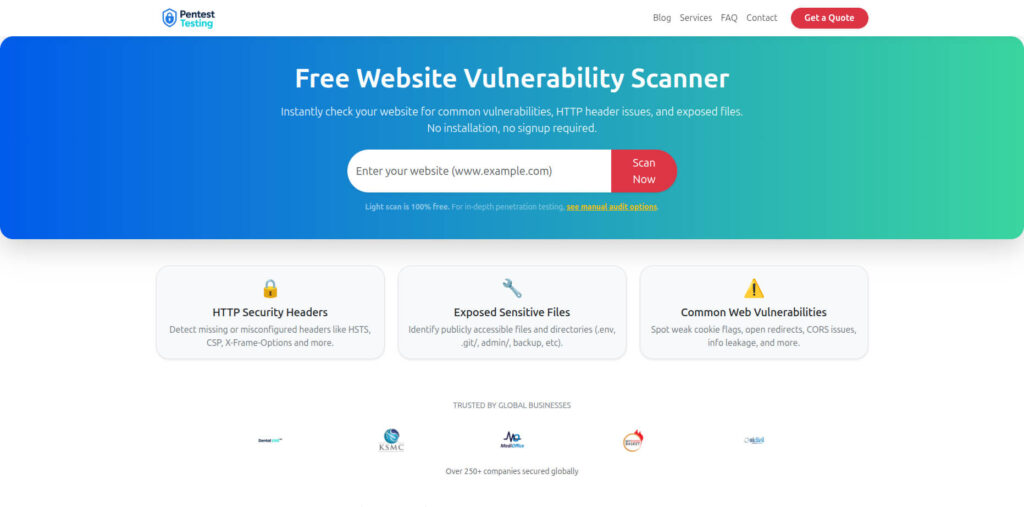
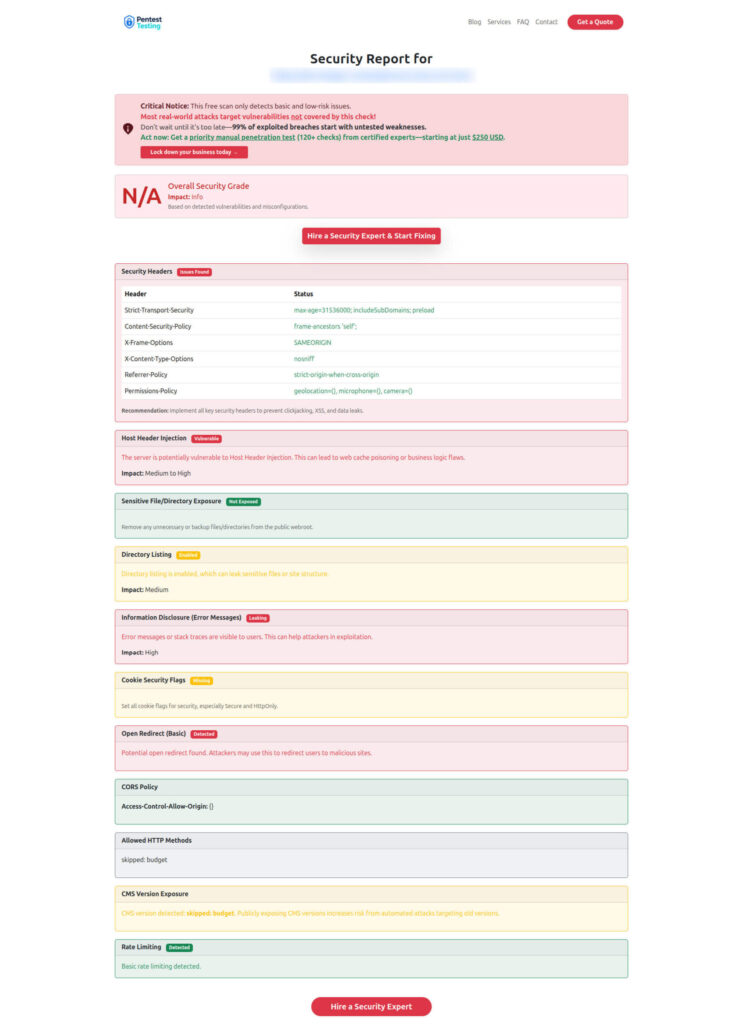
OAuth abuse often pairs with “easy wins” on the public attack surface (misconfig, exposed endpoints, weak headers). Run a fast baseline using the free tool by Pentest Testing Corp:
📸 Free Website Vulnerability Scanner tool (baseline check)
🧾 Sample vulnerability report to check Website Vulnerability
Where We fit (when you want this executed fast)
Cyber Rely & Pentest Testing Corp can help implement and validate this playbook end-to-end (policy + detection + abuse simulation):
- Risk assessment: https://www.pentesttesting.com/risk-assessment-services/
- Remediation: https://www.pentesttesting.com/remediation-services/
- DFIR / forensic analysis: https://www.pentesttesting.com/digital-forensic-analysis-services/
Recommended recent Cyber Rely reads (related)
- https://www.cybersrely.com/prevent-oauth-misconfiguration-in-typescript/
- https://www.cybersrely.com/ci-gates-for-api-security/
- https://www.cybersrely.com/secrets-as-code-patterns/
- https://www.cybersrely.com/map-ci-cd-findings-to-soc-2-and-iso-27001/
- https://www.cybersrely.com/cisa-kev-engineering-workflow-exploited/
- https://www.cybersrely.com/supply-chain-ci-hardening-2026/
- https://www.cybersrely.com/ai-phishing-prevention-dev-controls/
🔐 Frequently Asked Questions (FAQs)
Find answers to commonly asked questions about Stoping OAuth Abuse Fast.