7 Proven Supply-Chain CI Hardening Wins (2026)
Modern attackers don’t need to break your production firewall if they can poison what you ship. In 2026, Supply-Chain CI Hardening is how engineering teams prove build integrity, reduce dependency risk, and stop “small” pipeline shortcuts from turning into incident-level compromises.
This guide is dev-first and copy/paste-heavy. We’ll cover the real threats (typosquatting, dependency confusion, compromised packages, and CI runner compromise), then ship a minimum baseline fast. Finally, we’ll wire a proven pattern: SBOM + SLSA + dependency pinning, enforced with policy-as-code so unsafe builds fail closed.

CISA KEV Engineering Workflow Steps (24–72h Exploited-Vuln Lane) — Build a KEV-driven fast lane with PR gates, canary verification, and audit-ready release evidence. https://www.cybersrely.com/cisa-kev-engineering-workflow-exploited/
Threat model: what Supply-Chain CI Hardening is defending against
1) Typosquatting & look-alike packages
Someone sneaks a near-identical dependency into a PR (reqeusts vs requests, react-domm vs react-dom) and your CI happily installs it.
2) Compromised packages & maintainer takeovers
Legitimate packages get hijacked. You pull the “right” name, but a new malicious version ships.
3) Dependency confusion
Your build system resolves a public package instead of your private internal one (same name, higher version).
4) CI runner compromise
If an attacker gets code execution in your runner (or in a build container), they can steal tokens, rewrite artifacts, and publish poisoned builds.
Key reality: these threats are easier when builds are not reproducible, dependencies are not pinned, and artifacts aren’t verifiably signed and attested.
Win #1: Ship the “minimum viable” Supply-Chain CI Hardening baseline (fast)
If you do nothing else this week, do these:
A) Lockfiles everywhere
- npm:
package-lock.json/pnpm-lock.yaml/yarn.lock - Python: pinned requirements with hashes
- Go:
go.sum - Maven/Gradle: dependency lock / fixed versions
CI enforcement (example):
# Fail if lockfile changes are missing
git diff --name-only origin/main...HEAD | grep -E "(package.json|pyproject.toml|go.mod|pom.xml|build.gradle)" >/dev/null \
  && git diff --name-only origin/main...HEAD | grep -E "(package-lock.json|pnpm-lock.yaml|yarn.lock|requirements.txt|go.sum)" >/dev/null \
  || { echo "Dependency file changed without lockfile update"; exit 1; }
B) No “floating” versions (and no floating tags)
Bad: latest, main, ^1.2.0 (for high-risk runtime deps), unpinned GitHub Actions, unpinned containers.
Good: pinned versions, pinned commits, pinned image digests.
Docker digest pinning:
# Bad
FROM python:3.12-slim

# Good (pin digest)
FROM python:3.12-slim@sha256:REPLACE_WITH_REAL_DIGEST
GitHub Actions pinning (commit SHA):
# Bad
- uses: actions/checkout@v4

# Better (pin exact commit)
- uses: actions/checkout@b4ffde65f46336ab88eb53be808477a3936bae11
C) Use private registries correctly
npm .npmrc (prefer private first for internal scopes):
@yourorg:registry=https://registry.yourcompany.example/
registry=https://registry.npmjs.org/
always-auth=true
pip pip.conf (avoid accidental public resolution):
[global]
index-url = https://pypi.yourcompany.example/simple
# Only add extra-index-url if you must, and monitor it tightly
Win #2: Pin dependencies with hashes (Python) and lock with intent (JS)
Python: requirements.txt with hashes (strong baseline)
pip-compile --generate-hashes --output-file=requirements.txt pyproject.tomlExample requirements.txt:
requests==2.32.3 \
  --hash=sha256:aaaaaaaaaaaaaaaaaaaaaaaaaaaaaaaaaaaaaaaaaaaaaaaaaaaaaaaaaaaaaaaa \
  --hash=sha256:bbbbbbbbbbbbbbbbbbbbbbbbbbbbbbbbbbbbbbbbbbbbbbbbbbbbbbbbbbbbbbbb
Install in CI:
pip install --require-hashes -r requirements.txtNode.js: enforce npm ci (not npm install)
npm ci --ignore-scriptsWhy --ignore-scripts? It reduces risk from malicious lifecycle scripts. If you need scripts, selectively allow them (see policy gating below).
Win #3: Stop dependency confusion with naming + resolution rules
npm: scope your internal packages
Use @yourorg/* for internal packages. It prevents collisions with public names and makes registry routing cleaner.
Maven/Gradle: lock group IDs and repos
Maven example (restrict repositories):
<repositories>
  <repository>
    <id>internal</id>
    <url>https://maven.yourcompany.example/repository/releases</url>
  </repository>
</repositories>
Gradle example (fail on unexpected repos):
repositories {
  maven { url "https://maven.yourcompany.example/repository/releases" }
  // Avoid broad defaults unless you need them
}
Win #4: Generate an SBOM every build (CycloneDX/SPDX)
An SBOM is your “what exactly did we ship?” answer. For Supply-Chain CI Hardening, SBOMs become actionable when they’re generated in CI, bound to a build digest, and stored as evidence.
CycloneDX SBOM (example with Syft → CycloneDX JSON)
syft dir:. -o cyclonedx-json > sbom.cdx.jsonSPDX SBOM (example)
syft dir:. -o spdx-json > sbom.spdx.jsonStore SBOMs with your build artifacts:
mkdir -p out/evidence
cp sbom.*.json out/evidence/
Win #5: Add SLSA provenance (attestation) so builds become verifiable
SBOM tells you what is inside; SLSA provenance tells you how it was built and from what source, so you can verify build integrity and reduce “poisoned build” risk.
Minimal provenance shape (high-level)
{
  "_type": "https://in-toto.io/Statement/v1",
  "predicateType": "https://slsa.dev/provenance/v1",
  "subject": [{"name":"artifact","digest":{"sha256":"..."}}],
  "predicate": {
    "builder": {"id":"ci-system"},
    "buildConfig": {"ref":"git-sha"},
    "metadata": {"buildInvocationID":"ci-run-id"}
  }
}
GitHub Actions: build → SBOM → provenance → sign → verify
name: supply-chain-ci-hardening
on: [push]

permissions:
  contents: read
  id-token: write
  packages: write

jobs:
  build:
    runs-on: ubuntu-latest
    steps:
      - name: Checkout (pin your actions)
        uses: actions/checkout@b4ffde65f46336ab88eb53be808477a3936bae11

      - name: Install deps (locked)
        run: |
          npm ci --ignore-scripts

      - name: Build
        run: |
          npm run build

      - name: Generate SBOM (CycloneDX)
        run: |
          syft dir:. -o cyclonedx-json > sbom.cdx.json

      - name: Generate minimal provenance
        run: |
          cat > provenance.json <<'JSON'
          {
            "_type":"https://in-toto.io/Statement/v1",
            "predicateType":"https://slsa.dev/provenance/v1",
            "subject":[{"name":"app-build","digest":{"sha256":"${{ github.sha }}"}}],
            "predicate":{
              "builder":{"id":"github-actions"},
              "buildConfig":{"ref":"${{ github.ref }}"},
              "metadata":{"buildInvocationID":"${{ github.run_id }}"}
            }
          }
          JSON

      - name: Sign artifacts + attest (keyless pattern)
        run: |
          # Example commands if you use Sigstore/cosign
          # cosign sign <your-artifact-or-image>
          # cosign attest --predicate sbom.cdx.json --type cyclonedx <artifact>
          # cosign attest --predicate provenance.json --type slsaprovenance <artifact>
          echo "Signing/attestation step goes here"

      - name: Verify before publish/deploy (fail closed)
        run: |
          # cosign verify <artifact>
          # cosign verify-attestation --type slsaprovenance <artifact>
          # cosign verify-attestation --type cyclonedx <artifact>
          echo "Verification gate goes here"
Practical tip: even if you start with minimal provenance, treat it like an interface you’ll tighten over time (builder identity, source URI, dependency inputs, hermetic constraints).
Win #6: Enforce policy-as-code gates (block unsigned artifacts + risky deps)
This is where Supply-Chain CI Hardening stops being “nice documentation” and becomes a merge-blocking system.
Gate 1: Block new dependencies unless approved
Detect new dependencies by diffing lockfiles (simple but effective):
# scripts/new_deps.sh
set -euo pipefail

BASE="${1:-origin/main}"
git fetch origin main:refs/remotes/origin/main >/dev/null 2>&1 || true

changed="$(git diff --name-only "$BASE"...HEAD | grep -E '(package-lock.json|pnpm-lock.yaml|yarn.lock)$' || true)"
[ -z "$changed" ] && exit 0

echo "Lockfile changed: $changed"
echo "Require approval from CODEOWNERS or security reviewers."
exit 1
In CI:
- name: Block unreviewed dependency changes
  run: bash scripts/new_deps.sh
Gate 2: Block “unsigned” or “unattested” artifacts (policy skeleton)
If your verification step outputs JSON, you can use Conftest/OPA to enforce it.
Example Rego (conceptual):
package supplychain

default allow = false

allow {
  input.signature.verified == true
  input.attestations.slsa.verified == true
  input.attestations.sbom.verified == true
}

deny_reason[msg] {
  not input.signature.verified
  msg := "Artifact signature missing/invalid"
}
deny_reason[msg] {
  not input.attestations.slsa.verified
  msg := "SLSA provenance missing/invalid"
}
deny_reason[msg] {
  not input.attestations.sbom.verified
  msg := "SBOM attestation missing/invalid"
}
CI use:
conftest test verify.json --policy policy/Gate 3: Block lifecycle scripts unless explicitly allowed
npm ci --ignore-scripts
# If needed, allow only selected scripts in a controlled step:
npm run build
Win #7: Harden the CI runner (because runners are the new production)
If a runner is compromised, dependency pinning alone won’t save you.
Baseline runner hardening checklist
- Prefer ephemeral runners (fresh VM/container each job).
- Minimal permissions: short-lived tokens, least-privilege scopes.
- Egress controls: only allow required registries and artifact stores.
- Separate build and deploy identities (and require approvals for deploy).
- Don’t mount long-lived credentials into build steps.
- Store evidence artifacts immutably (digest-addressed).
Example: fail builds if “high-risk” env vars appear
env | grep -E "(AWS_SECRET|GCP_KEY|AZURE_CLIENT_SECRET|NPM_TOKEN|PAT_)" \
  && { echo "High-risk secret present in build env"; exit 1; } || true
Incident response: what to do after a poisoned build (rotate, revoke, rebuild clean)
When you suspect supply-chain compromise, time matters. Your goal is to restore trustworthy builds, not just “patch the app.”
1) Contain
- Freeze publishing (packages, images) and pause release workflows.
- Disable compromised runner pools or self-hosted runners.
2) Rotate and revoke (in this order)
- Revoke CI tokens (registry tokens, GitHub/GitLab tokens, cloud OIDC trust, signing identities).
- Rotate secrets tied to build/publish (package publish tokens, artifact repo creds).
- Invalidate any exposed session material.
3) Rebuild from a known-clean baseline
- Rebuild from a clean commit.
- Regenerate SBOMs and provenance.
- Re-sign and re-attest artifacts.
- Verify at deploy, fail closed.
4) Prove what changed
- Diff SBOMs between last-known-good and current.
- Confirm provenance chain matches expected builder + source refs.
- Backfill evidence bundles for auditors and incident review.
Operational tip: treat “rebuild cleanly” as a drill you practice. If it’s painful, it’s a signal your Supply-Chain CI Hardening still has gaps.
Bonus: Quick external reality check with our free scanner
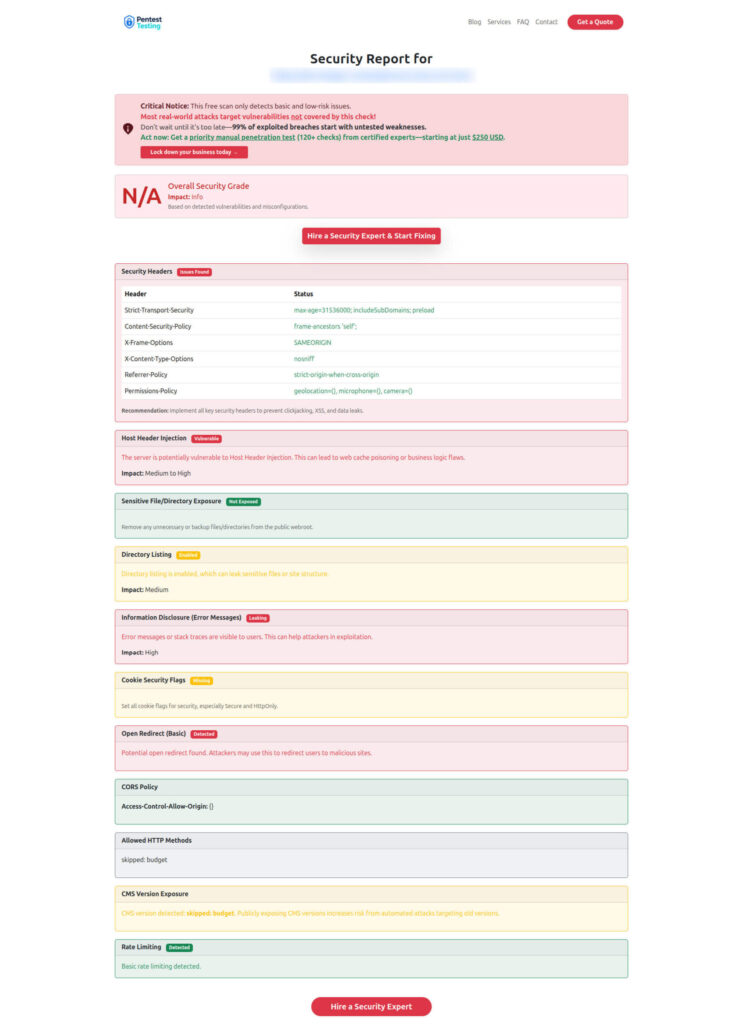
Even though this post is about CI/CD, many supply-chain incidents still end in external exploitation. Keep a simple feedback loop: “what are we exposing right now?”
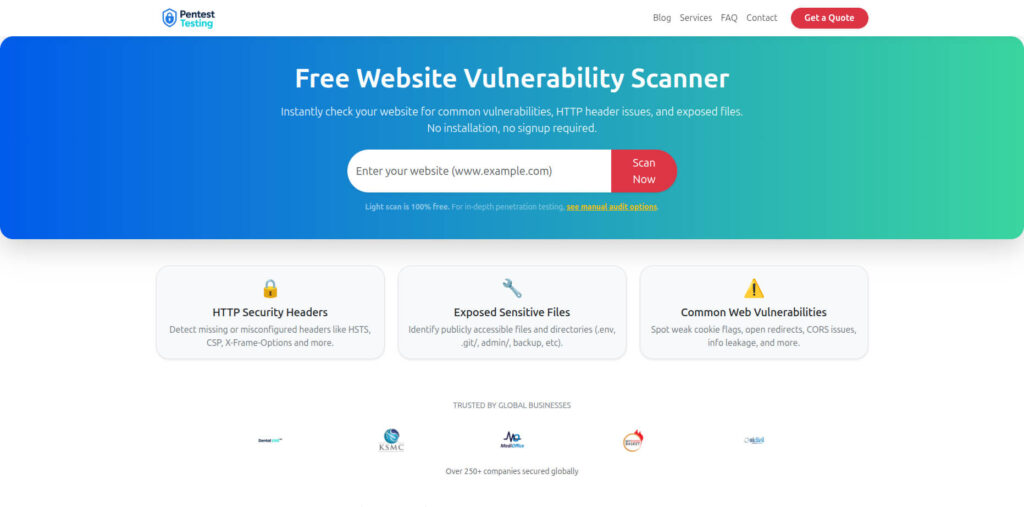
Try our free Website Vulnerability Scanner: https://free.pentesttesting.com/
Free Website Vulnerability Scanner tool Dashboard:
Sample report by our tool to check Website Vulnerability:
When to bring in formal help (risk + remediation)
If you’re implementing Supply-Chain CI Hardening for regulated environments or you need audit-ready evidence fast, these are the two common tracks:
- Risk assessment services: https://www.pentesttesting.com/risk-assessment-services/
Use this when you need a structured view of supply-chain + CI/CD risk, prioritized by likelihood/impact. - Remediation services: https://www.pentesttesting.com/remediation-services/
Use this when you want hands-on hardening: CI runner isolation, artifact signing gates, dependency policy, and evidence pipelines.
Related Cyber Rely reads (to go deeper)
If you want companion playbooks that pair naturally with Supply-Chain CI Hardening, start with these:
- SLSA pipeline build integrity guide: https://www.cybersrely.com/slsa-1-1-implementation-in-ci-cd/
- Software supply chain security tactics (SBOM + VEX + SLSA): https://www.cybersrely.com/software-supply-chain-security-tactics/
- Secrets lifecycle patterns for CI/CD: https://www.cybersrely.com/secrets-as-code-patterns/
- What to do after token leaks: https://www.cybersrely.com/fix-a-leaked-github-token/
- Practice drills that prove controls work: https://www.cybersrely.com/security-chaos-experiments-for-ci-cd/
- Merge-blocking OPA gates for APIs (pairs well with CI evidence): https://www.cybersrely.com/ci-gates-for-api-security/
🔐 Frequently Asked Questions (FAQs)
Find answers to commonly asked questions about Supply-Chain CI Hardening (2026).