5 Proven Ways to Use LLM Pentest Agents in CI Safely
LLM pentest agents are moving from research toys to real CI/CD jobs. Tools inspired by AutoPentester and PentestAgent can now:
- crawl your staging app,
- chain classic scanners and custom scripts,
- reason about impact, and
- emit structured findings back into your backlog.
Used carelessly, they can also brute-force prod, follow internal links, or leak secrets in prompts.
This guide shows how to run LLM pentest agents in CI safely—as engineering leaders would actually deploy them—without breaking production or your compliance story.
Want a deeper, code-level playbook for secret rotation and just-in-time access? Read our follow-up guide, Secrets as Code: 7 Proven Patterns for Rotation, JIT Access & Audit-Ready Logs .
TL;DR for engineering leaders
If you remember nothing else about LLM pentest agents in CI, keep this:
- Never point agents at prod. Use staging-only, ephemeral environments created per PR or per release candidate.
- Lock down identity and network. Give agents restricted test accounts, scoped tokens, and constrained egress.
- Bound tools and time. Whitelist tools, restrict dangerous actions, and hard-stop agents with timeouts and step budgets.
- Normalize results. Convert raw agent output into tickets + evidence, mapped to OWASP, CWE, SOC 2, ISO 27001, PCI DSS, etc.
- Wire them into CI/CD like any other gate. Put an “AI pentest step” beside SAST/DAST and our Website Vulnerability Scanner Online free, then escalate real risk into formal risk assessment and remediation workstreams.
What LLM pentest agents actually do (in CI terms)
At a high level, the better-designed agents follow a predictable loop:
- Recon – discover routes, API endpoints, parameters, and roles.
- Scanning – run targeted checks (XSS, SQLi, auth bypass, IDOR, misconfig, etc.).
- Exploitation attempts – validate whether a weakness is actually exploitable.
- Reporting – summarize issues, attach evidence, and suggest fixes.
Your CI/CD pipeline cares about:
- Inputs: target URL(s), environment, test credentials, scope.
- Outputs: machine-readable JSON, logs, and links/screenshots to evidence.
- Contracts: max runtime, allowed tools, and how failures impact the build.
LLM pentest agents augment, not replace:
- SAST / code scanning
- DAST / traditional web scanners
- Manual pentests and red-team-style testing
Think of them as smart fuzzers that can understand flows (login, checkout, OAuth, multi-tenant apps) and reason about impact—particularly useful for complex web apps, APIs, GraphQL, and AI-powered apps that Cyber Rely and Pentest Testing Corp regularly test.
1) Keep LLM pentest agents in CI on staging & ephemeral environments
First rule of LLM pentest agents in CI: no production traffic.
Pattern: ephemeral staging per pull request
Create a short-lived staging environment (or “preview environment”) per PR. Point the agent only at that environment.
Example: GitHub Actions job that spins up an ephemeral environment and runs an LLM pentest agent
# .github/workflows/llm-pentest.yml
name: llm-pentest

on:
  pull_request:
    types: [opened, synchronize, reopened]

jobs:
  llm-pentest:
    runs-on: ubuntu-latest

    # Make sure this job runs after build/tests succeed
    needs: [test]

    permissions:
      contents: read
      id-token: write   # for cloud auth if you use OIDC
      pull-requests: write

    env:
      APP_NAME: my-app
      STAGE_NAMESPACE: pr-${{ github.event.number }}
      LLM_PENTEST_MAX_MINUTES: "20"

    steps:
      - name: Checkout repo
        uses: actions/checkout@v4

      - name: Deploy ephemeral environment
        run: |
          kubectl create namespace "$STAGE_NAMESPACE" || true
          helm upgrade --install "$APP_NAME" ./helm/chart \
            --namespace "$STAGE_NAMESPACE" \
            --set image.tag=${{ github.sha }}

          # Simple health check loop
          kubectl rollout status deploy/$APP_NAME -n "$STAGE_NAMESPACE" --timeout=300s

      - name: Discover staging URL
        id: url
        run: |
          HOST=$(kubectl get ingress $APP_NAME -n "$STAGE_NAMESPACE" \
            -o jsonpath='{.spec.rules[0].host}')
          echo "url=https://$HOST" >> "$GITHUB_OUTPUT"

      - name: Run LLM pentest agent (staging only)
        timeout-minutes: ${{ env.LLM_PENTEST_MAX_MINUTES }}
        env:
          TARGET_URL: ${{ steps.url.outputs.url }}
          PENTEST_ENV: "staging-pr"
        run: |
          echo "Running LLM pentest agent against $TARGET_URL"
          docker run --rm \
            -e TARGET_URL="$TARGET_URL" \
            -e PENTEST_ENV="$PENTEST_ENV" \
            ghcr.io/your-org/llm-pentest-agent:latest \
            --max-findings 50 \
            --output /tmp/llm-findings.json

          cp /tmp/llm-findings.json llm-findings.json

      - name: Upload findings as artifact
        uses: actions/upload-artifact@v4
        with:
          name: llm-pentest-findings
          path: llm-findings.json

      - name: Tear down ephemeral environment
        if: always()
        run: |
          kubectl delete namespace "$STAGE_NAMESPACE" --ignore-not-found
Key safety points:
- The target URL is derived from an ephemeral namespace, not a prod hostname.
- The job has limited permissions and a hard timeout.
- If the agent misbehaves or loops, the namespace is destroyed at the end.
When you combine this with Cyber Rely’s web application penetration testing for critical releases, you get both continuous coverage in CI and deep, manual coverage before high-risk launches.
2) Lock down credentials, tokens, and network blast radius
An LLM pentest agent is still “just another CI job”, so treat it like a potentially hostile test harness:
- Use dedicated test accounts: no shared prod accounts; stage-only identities.
- Scope tokens minimally: least-privilege API keys, limited tenant access.
- Constrain network egress: restrict outbound traffic to your staging environment and approved third-party dependencies.
- Separate data: point agents at anonymized or synthetic tenant data wherever possible.
Example: scoped GitHub token + restricted cloud role
jobs:
  llm-pentest:
    runs-on: ubuntu-latest
    permissions:
      contents: read      # no repo write
      id-token: write     # for short-lived cloud creds
      pull-requests: write

    env:
      TARGET_TENANT: "staging-tenant"
      LLM_AGENT_ROLE: "llm-pentest-staging-role"

    steps:
      - uses: actions/checkout@v4

      - name: Get short-lived cloud credentials for agent
        id: cloud-auth
        run: |
          # Example: exchange GitHub OIDC token for a cloud role limited to staging
          # az login --service-principal ... or aws sts assume-role-with-web-identity ...
          echo "access_key_id=REDACTED" >> "$GITHUB_OUTPUT"
          echo "secret_access_key=REDACTED" >> "$GITHUB_OUTPUT"

      - name: Run agent with limited credentials
        env:
          CLOUD_ACCESS_KEY_ID: ${{ steps.cloud-auth.outputs.access_key_id }}
          CLOUD_SECRET_ACCESS_KEY: ${{ steps.cloud-auth.outputs.secret_access_key }}
          TARGET_TENANT: ${{ env.TARGET_TENANT }}
        run: |
          ./llm-agent \
            --tenant "$TARGET_TENANT" \
            --max-scope "/apps/my-app" \
            --no-prod-dns \
            --output llm-findings.json
On the infrastructure side, make sure the network layer blocks access from CI runners to prod subnets, internal admin panels, and sensitive data stores that aren’t explicitly in scope.
When you later invite Pentest Testing Corp to perform a risk assessment of your CI/CD and testing architecture, these least-privilege patterns become strong control evidence for frameworks like SOC 2, ISO 27001, HIPAA, PCI DSS, and GDPR.
3) Bound tools, scopes, and time for your CI pentest agents
LLM pentest agents are only as safe as the tools you let them invoke and the time you allow them to run.
Agent-side config: whitelisted tools and scopes
Assume you have an internal harness that wraps your LLM agent. Give it an explicit, versioned config:
// config/llm-pentest.staging.json
{
  "target": {
    "baseUrl": "https://staging.my-app.example",
    "allowedHosts": ["staging.my-app.example"],
    "disallowedPaths": ["/admin", "/internal/.*", "/prod-api/.*"]
  },
  "tools": [
    {
      "name": "http-client",
      "maxRequests": 800,
      "maxConcurrency": 10
    },
    {
      "name": "sql-injection-checker",
      "maxTargets": 40,
      "maxExecutionSeconds": 300
    },
    {
      "name": "xss-checker",
      "maxTargets": 40,
      "maxExecutionSeconds": 300
    }
  ],
  "limits": {
    "maxSteps": 500,
    "maxDurationSeconds": 1200,
    "maxTokens": 160000
  }
}
Your agent startup call can then enforce:
llm-pentest-agent \
  --config config/llm-pentest.staging.json \
  --output llm-findings.json
CI-side timeouts
Pair agent-side limits with CI-side hard timeouts:
      - name: Run LLM pentest agent
        timeout-minutes: 20
        run: |
          llm-pentest-agent \
            --config config/llm-pentest.staging.json \
            --output llm-findings.json
This is the same philosophy Cyber Rely uses for CI gates and policy-as-code work: bounded, predictable controls that generate evidence, not chaos, even when scanning for complex issues such as API abuse or software supply chain risk.
4) Normalize LLM findings into tickets and compliance evidence
Raw LLM output is rarely what your teams or auditors want. You need a normalized schema for findings, plus a small pipeline that:
- de-duplicates and risk-ranks issues,
- maps them to standards (OWASP Top 10, CWE, SOC 2, PCI DSS, etc.), and
- creates or updates tickets with links to evidence.
Example: TypeScript normalizer for LLM pentest findings
Assume the agent outputs llm-findings.json as an array of “raw” issues.
// scripts/normalize-llm-findings.ts
import fs from "node:fs";

type RawFinding = {
  id: string;
  title: string;
  description: string;
  severity: "info" | "low" | "medium" | "high" | "critical";
  owasp?: string;
  cwe?: string;
  endpoint?: string;
  evidence?: { url?: string; request?: string; responseSnippet?: string };
};

type NormalizedFinding = {
  id: string;
  title: string;
  severity: "LOW" | "MEDIUM" | "HIGH" | "CRITICAL";
  category: "APPSEC" | "API" | "AUTH" | "SESSION" | "SUPPLY_CHAIN";
  endpoint?: string;
  standards: {
    owaspTop10?: string;
    cwe?: string;
    soc2?: string[];
    iso27001?: string[];
    pciDss?: string[];
  };
  description: string;
  recommendation: string;
  evidenceLinks: string[];
};

function mapSeverity(s: RawFinding["severity"]): NormalizedFinding["severity"] {
  switch (s) {
    case "info":
    case "low":
      return "LOW";
    case "medium":
      return "MEDIUM";
    case "high":
      return "HIGH";
    case "critical":
      return "CRITICAL";
  }
}

function mapStandards(raw: RawFinding): NormalizedFinding["standards"] {
  const standards: NormalizedFinding["standards"] = {};
  if (raw.owasp) standards.owaspTop10 = raw.owasp;
  if (raw.cwe) standards.cwe = raw.cwe;

  // Example: naive mapping for demo purposes
  const soc2: string[] = [];
  const iso: string[] = [];
  const pci: string[] = [];

  if (raw.title.toLowerCase().includes("xss")) {
    soc2.push("CC7.1");
    iso.push("A.14.2.5");
    pci.push("6.4");
  }
  if (raw.title.toLowerCase().includes("sql injection")) {
    soc2.push("CC7.1", "CC7.2");
    iso.push("A.14.2.8");
    pci.push("6.4", "6.5.1");
  }

  if (soc2.length) standards.soc2 = soc2;
  if (iso.length) standards.iso27001 = iso;
  if (pci.length) standards.pciDss = pci;

  return standards;
}

function normalize(raw: RawFinding): NormalizedFinding {
  return {
    id: raw.id,
    title: raw.title,
    severity: mapSeverity(raw.severity),
    category: raw.endpoint?.includes("/api")
      ? "API"
      : "APPSEC",
    endpoint: raw.endpoint,
    standards: mapStandards(raw),
    description: raw.description,
    recommendation:
      "Review the affected endpoint, add tests, and deploy a fix. Link the remediation commit and re-run the LLM pentest job.",
    evidenceLinks: raw.evidence?.url ? [raw.evidence.url] : [],
  };
}

const rawData = JSON.parse(fs.readFileSync("llm-findings.json", "utf8")) as RawFinding[];
const normalized = rawData.map(normalize);

fs.writeFileSync("llm-findings.normalized.json", JSON.stringify(normalized, null, 2));
console.log(`Normalized ${normalized.length} findings`);
Then wire it into CI:
      - name: Normalize LLM findings
        run: |
          npm ci
          npx ts-node scripts/normalize-llm-findings.ts

      - name: Upload normalized findings
        uses: actions/upload-artifact@v4
        with:
          name: llm-pentest-findings-normalized
          path: llm-findings.normalized.json
From there you can:
- create Jira / Azure DevOps tickets per HIGH/CRITICAL issue,
- attach evidence from the agent and from the Website Vulnerability Scanner,
- later hand the normalized findings to Pentest Testing Corp’s Risk Assessment Services/Remediation Services for a formal, framework-mapped plan.
5) A reference GitHub Actions workflow: AI pentest beside SAST & DAST
Let’s put it all together into a single CI workflow where the AI pentest step is just one part of a coherent security job.
# .github/workflows/security-suite.yml
name: security-suite

on:
  pull_request:
    types: [opened, synchronize, reopened]
  push:
    branches: [main]

jobs:
  build-and-test:
    runs-on: ubuntu-latest
    steps:
      - uses: actions/checkout@v4
      - name: Install deps
        run: npm ci
      - name: Run tests
        run: npm test

  security:
    runs-on: ubuntu-latest
    needs: [build-and-test]

    permissions:
      contents: read
      id-token: write
      pull-requests: write

    env:
      STAGE_NAMESPACE: pr-${{ github.event.number }}
      LLM_PENTEST_MAX_MINUTES: "20"

    steps:
      - uses: actions/checkout@v4

      # 1) Deploy ephemeral staging
      - name: Deploy ephemeral environment
        run: |
          kubectl create namespace "$STAGE_NAMESPACE" || true
          helm upgrade --install app ./helm/chart \
            --namespace "$STAGE_NAMESPACE" \
            --set image.tag=${{ github.sha }}

          kubectl rollout status deploy/app -n "$STAGE_NAMESPACE" --timeout=300s

      - name: Discover staging URL
        id: url
        run: |
          HOST=$(kubectl get ingress app -n "$STAGE_NAMESPACE" \
            -o jsonpath='{.spec.rules[0].host}')
          echo "url=https://$HOST" >> "$GITHUB_OUTPUT"

      # 2) SAST placeholder
      - name: Run SAST (example)
        run: |
          echo "Run your SAST tool here (e.g., semgrep, CodeQL)"

      # 3) DAST / free Website Vulnerability Scanner hook
      - name: Run Website Vulnerability Scanner (external job)
        env:
          TARGET_URL: ${{ steps.url.outputs.url }}
        run: |
          echo "Call your integration that hits free.pentesttesting.com"
          echo "Use TARGET_URL=$TARGET_URL for a light web scan"

      # 4) LLM pentest agent
      - name: Run LLM pentest agent
        timeout-minutes: ${{ env.LLM_PENTEST_MAX_MINUTES }}
        env:
          TARGET_URL: ${{ steps.url.outputs.url }}
        run: |
          llm-pentest-agent \
            --config config/llm-pentest.staging.json \
            --output llm-findings.json

      - name: Normalize LLM findings
        run: |
          npm ci
          npx ts-node scripts/normalize-llm-findings.ts

      # 5) Comment summary back on PR
      - name: Comment summary on PR
        if: github.event_name == 'pull_request'
        env:
          GITHUB_TOKEN: ${{ secrets.GITHUB_TOKEN }}
        run: |
          SUMMARY=$(node scripts/summarize-llm-findings.js)
          gh pr comment ${{ github.event.number }} --body "$SUMMARY"

      - name: Upload security artifacts
        uses: actions/upload-artifact@v4
        with:
          name: security-suite-artifacts
          path: |
            llm-findings.json
            llm-findings.normalized.json

      - name: Tear down ephemeral environment
        if: always()
        run: kubectl delete namespace "$STAGE_NAMESPACE" --ignore-not-found
This pattern mirrors the CI/CD-oriented content Cyber Rely already publishes (for example, on CI gates for API security, embedded compliance, PCI DSS 4.x remediation, and mapping CI findings to SOC 2 / ISO 27001), and slots LLM pentest agents into the same evidence-producing pipeline.
Screenshots: free tool page + sample report
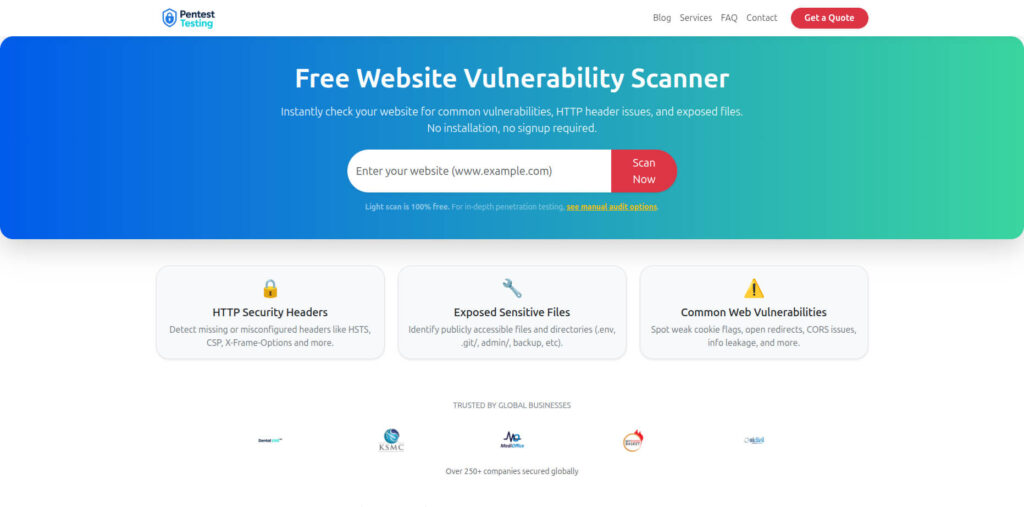
Free Website Vulnerability Scanner landing page
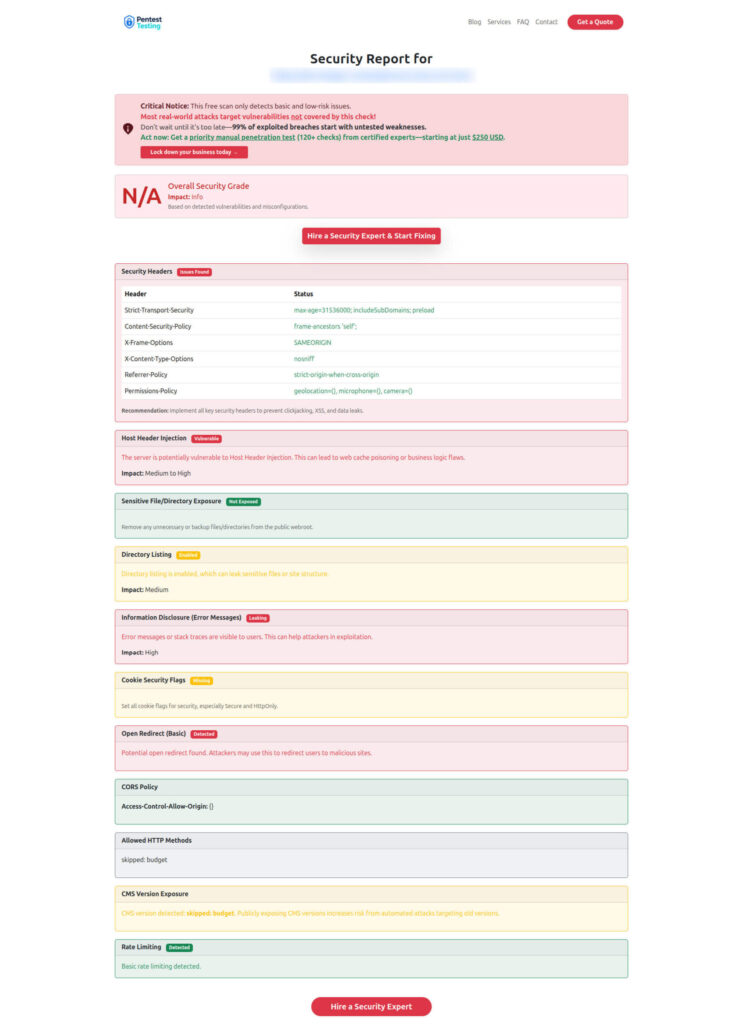
Sample assessment report to check Website Vulnerability
Where Cyber Rely & Pentest Testing Corp fit into your LLM pentest pipeline
Once your LLM pentest agents in CI are consistently generating findings and evidence, you’ll typically hit one of these points:
- You need an independent third-party risk assessment mapped to SOC 2, ISO 27001, PCI DSS 4.x, HIPAA, and GDPR.
- You need structured remediation plans plus documentation for auditors and customers.
- You need deep manual web/API/AI pentests to complement automated coverage.
That’s where Cyber Rely and Pentest Testing Corp connect:
- Use Cyber Rely’s Web Application Penetration Testing and API Penetration Testing Services when you want human-led exploitation and threat modeling on top of your CI automation.
- Use Pentest Testing Corp’s Risk Assessment Services and Remediation Services when you’re ready to turn CI findings and free scanner output into formal reports, prioritized remediation roadmaps, and audit-ready evidence sets.
- Keep running the free Website Vulnerability Scanner as a recurring, low-friction control that complements both CI agents and scheduled pentests.
This “automation first, expert-backed” pattern is already reflected across existing Cyber Rely content on supply-chain security, CI gates, embedded compliance, and EU AI Act readiness.
Related Cyber Rely posts
When you publish this article on the Cyber Rely blog, consider adding a small “Related reading” section that points to existing CI/CD-heavy guides:
- “5 Proven CI Gates for API Security: OPA Rules You Can Ship” – shows how to implement merge-blocking CI gates for APIs using OPA/Rego and GitHub Actions.
- “7 Proven Software Supply Chain Security Tactics” – SBOM, VEX, and SLSA wiring that pairs naturally with LLM pentest jobs in CI.
- “7 Powerful Embedded Compliance in CI/CD Tactics” – patterns for turning your CI artifacts into compliance evidence.
- “5 Proven Ways to Map CI/CD Findings to SOC 2 and ISO 27001” – normalizing scanner output into control mappings, similar to how we normalized LLM findings above.
- “7 Proven Wins: EU AI Act for Engineering Leaders” – governance and evidence patterns for AI-heavy systems that mesh nicely with LLM pentest agents.
Used together, LLM pentest agents in CI, the free Website Vulnerability Scanner, and expert services from Cyber Rely and Pentest Testing Corp give you a defensible, developer-friendly security posture—from the first commit to the final audit.
🔐 Frequently Asked Questions (FAQs)
Find answers to commonly asked questions about LLM pentest agents in CI.