7 Proven Dev Controls for AI Phishing Prevention
Why AI phishing is now an engineering problem
Phishing used to be “an email thing.” Today, AI-generated phishing and impersonation campaigns are software problems too: they exploit your product’s login flows, password resets, webhook endpoints, support channels, and CI/CD credentials. If your only strategy is detection (spam filters, user training, post-incident cleanup), attackers will still get what they want: credentials, session tokens, money movement, or privileged actions.
AI phishing prevention works best when engineering teams ship controls that reduce blast radius by default:
- Push-time controls that stop risky changes (secrets, email templates, domains, auth configs) from reaching production.
- Runtime guards that slow or block abnormal behavior (takeover attempts, credential stuffing, suspicious resets).
- Telemetry that becomes evidence (what happened, why you blocked it, what control triggered, and what changed afterward).
If you’re building these controls into pipelines and apps, you’re already doing modern platform security.
For a practical checklist of non-human identity security controls, including API key security and CI/CD guardrails, read this: https://www.cybersrely.com/non-human-identity-security-controls/
The threat model engineering leads should care about
For engineering teams, phishing and impersonation typically show up as:
- Account takeover paths: password reset abuse, MFA fatigue, SIM swap recovery, OAuth consent scams.
- Brand impersonation: lookalike domains, spoofed support, fake invoices, fake “security alerts.”
- Token/secret theft that enables impersonation: leaked CI variables, exposed API keys, stolen repo tokens.
- Confused-deputy actions: internal tools or bots executing attacker-crafted requests (support tooling, admin panels, webhooks).
Your goal with AI phishing prevention is to make these paths expensive, noisy, and short-lived.
Build smart telemetry that catches abnormal flows
A practical pattern: log security events as structured “risk signals”, not ad-hoc strings. This makes it easy to build alert rules, risk scoring, and audit exports later.
Code example: Emit security events with OpenTelemetry (Node.js)
// security-events.js (Node/Express)
import express from "express";
import crypto from "crypto";
import { trace } from "@opentelemetry/api";

const app = express();
app.use(express.json());

function securityEvent(req, name, attrs = {}) {
  const tracer = trace.getTracer("security");
  const span = tracer.startSpan(name);
  span.setAttributes({
    "sec.event": name,
    "sec.user_id": req.header("x-user-id") || "anonymous",
    "sec.ip": req.ip,
    "sec.ua_hash": crypto.createHash("sha256").update(req.get("user-agent") || "").digest("hex"),
    "sec.path": req.path,
    ...attrs,
  });
  span.end();
}

// Example: password reset request
app.post("/auth/password-reset", async (req, res) => {
  securityEvent(req, "password_reset_requested", {
    "sec.email_hash": crypto.createHash("sha256").update(req.body.email || "").digest("hex"),
  });

  // Your normal flow here...
  return res.status(202).json({ ok: true });
});

app.listen(3000);
What to capture (minimum viable signals)
- Auth: login, reset, MFA challenge, device/session creation, token refresh.
- Communication events: “security email sent”, “support ticket opened”, “invoice generated”.
- High-risk actions: payee changes, payout changes, admin role changes, API key creation.
- Context: IP, ASN/country (if available), device fingerprint, new/rare user agent, failed attempts.
This telemetry is the foundation for runtime AI phishing prevention guards.
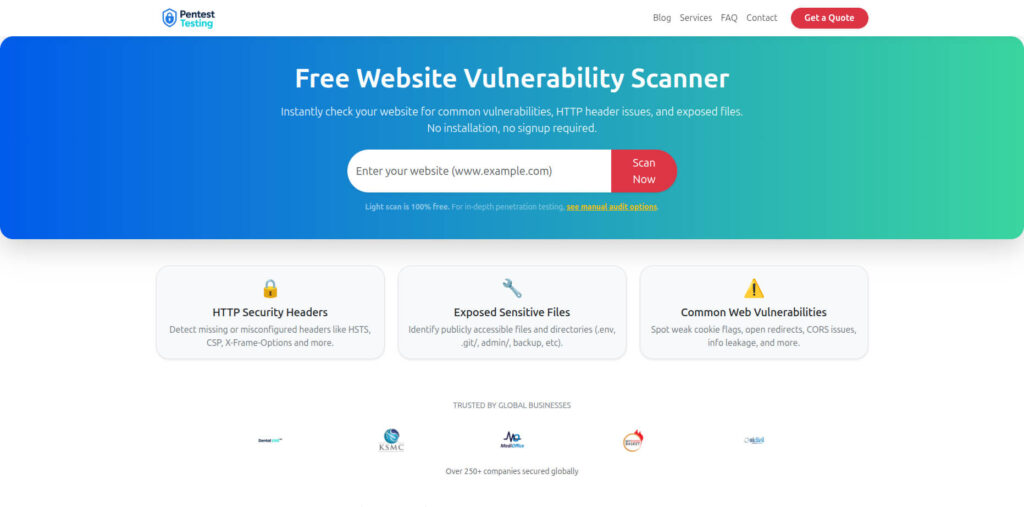
Free tool page (Website Vulnerability Scanner)
Push-time policy gates: stop phishing enablers before deploy
Attackers love engineering mistakes: secrets committed, permissive email templates, weak rate limits, missing headers, overly broad tokens. Push-time gates make those mistakes harder to ship.
1) Secret scanning (local + CI)
Pre-commit (fast prevention on developer machines) — use a local hook (or your internal repo mirror) so you’re not depending on public links:
# .pre-commit-config.yaml
repos:
  - repo: local
    hooks:
      - id: gitleaks
        name: gitleaks
        entry: gitleaks protect --staged --redact
        language: system
GitHub Actions gate (merge blocking):
# .github/workflows/secrets-gate.yml
name: secrets-gate
on: [pull_request]

permissions:
  contents: read

jobs:
  gitleaks:
    runs-on: ubuntu-latest
    steps:
      - uses: actions/checkout@v4
        with:
          fetch-depth: 0
      - name: Run gitleaks
        uses: gitleaks/gitleaks-action@v2
        env:
          GITLEAKS_ENABLE_UPLOAD_ARTIFACT: "false"
Why it matters to phishing: leaked tokens often become impersonation tooling (support access, email sending systems, admin endpoints).
2) Policy-as-code gate for risky auth and email changes (OPA / Conftest)
Treat changes to “phishing-sensitive” files as merge-blocking unless they pass explicit rules.
# policy/phishing_gates.rego
package phishing.gates

deny[msg] {
  input.kind == "pull_request"
  changed := input.changed_files[_]
  endswith(changed, "email-templates/")
  not input.approved_by_security
  msg := sprintf("Email template change requires security approval: %s", [changed])
}

deny[msg] {
  changed := input.changed_files[_]
  changed == "infra/auth/rate-limits.yaml"
  not input.tests_passed
  msg := "Rate limit config changed without passing security tests"
}
Run it as a PR check:
conftest test pr_context.json -p policy/3) DNS-level anti-spoofing as infrastructure code (SPF/DKIM/DMARC)
Even if your product is secure, spoofed email can still harm users and brand trust. Manage anti-spoofing records like code so changes are reviewed and tracked.
# Terraform example (Route53 DMARC TXT record)
resource "aws_route53_record" "dmarc" {
  zone_id = var.zone_id
  name    = "_dmarc"
  type    = "TXT"
  ttl     = 300
  records = [
    "v=DMARC1; p=quarantine; rua=mailto:[email protected]; fo=1; adkim=s; aspf=s"
  ]
}
AI phishing prevention is stronger when infrastructure changes are reviewed, tested, and auditable.
Runtime guards: turn detection into prevention
Runtime controls are where engineering teams win. The most effective runtime pattern is risk scoring + step-up controls.
1) Risk scoring service (TypeScript)
// risk-score.ts
type RiskSignal = {
  userId: string;
  ip: string;
  action: "login" | "password_reset" | "mfa_challenge" | "payout_change";
  failedAttemptsLast10m: number;
  isNewDevice: boolean;
  isNewCountry: boolean;
  velocityLast5m: number;
};

export function scoreRisk(s: RiskSignal): number {
  let score = 0;

  if (s.failedAttemptsLast10m >= 5) score += 30;
  if (s.isNewDevice) score += 20;
  if (s.isNewCountry) score += 25;
  if (s.velocityLast5m >= 10) score += 25;

  // High-risk action weighting
  if (s.action === "payout_change") score += 40;
  if (s.action === "password_reset") score += 15;

  return Math.min(score, 100);
}

export function decision(score: number) {
  if (score >= 80) return "BLOCK";
  if (score >= 50) return "STEP_UP"; // require stronger verification
  return "ALLOW";
}
2) Step-up verification for phishing-prone flows
Implement friction only when risk is high:
- Require phishing-resistant MFA (passkeys/WebAuthn) for admin, finance, and privileged actions.
- Add cooldowns (e.g., “reset email sent; try again in 2 minutes”).
- Confirm sensitive actions via out-of-band confirmation (in-app + email).
Code example: Signed, short-lived reset tokens (Python)
# reset_tokens.py
import time
import jwt  # PyJWT
from jwt import InvalidTokenError

RESET_SECRET = "replace-with-kms-backed-secret"
RESET_TTL_SECONDS = 15 * 60

def mint_reset_token(user_id: str) -> str:
  now = int(time.time())
  payload = {"sub": user_id, "iat": now, "exp": now + RESET_TTL_SECONDS, "typ": "pwd_reset"}
  return jwt.encode(payload, RESET_SECRET, algorithm="HS256")

def verify_reset_token(token: str) -> str:
  try:
    payload = jwt.decode(token, RESET_SECRET, algorithms=["HS256"])
    if payload.get("typ") != "pwd_reset":
      raise InvalidTokenError("wrong token type")
    return payload["sub"]
  except InvalidTokenError:
    raise ValueError("invalid or expired token")
3) Rate limiting and velocity controls (Nginx)
# nginx.conf (login + reset endpoints)
limit_req_zone $binary_remote_addr zone=auth_zone:10m rate=5r/s;

server {
  location /auth/login {
    limit_req zone=auth_zone burst=20 nodelay;
    proxy_pass http://app;
  }

  location /auth/password-reset {
    limit_req zone=auth_zone burst=10 nodelay;
    proxy_pass http://app;
  }
}
4) Lookalike domain detection for impersonation (Python)
If your app accepts domains (SSO config, email domains, integrations), add a similarity check to flag lookalikes.
# lookalike.py
def levenshtein(a: str, b: str) -> int:
  if a == b: return 0
  if not a: return len(b)
  if not b: return len(a)
  prev = list(range(len(b) + 1))
  for i, ca in enumerate(a, 1):
    cur = [i]
    for j, cb in enumerate(b, 1):
      ins = cur[j - 1] + 1
      dele = prev[j] + 1
      sub = prev[j - 1] + (ca != cb)
      cur.append(min(ins, dele, sub))
    prev = cur
  return prev[-1]

def is_lookalike(candidate: str, brand: str, max_dist: int = 2) -> bool:
  cand = candidate.lower().strip()
  br = brand.lower().strip()
  return levenshtein(cand, br) <= max_dist and cand != br

# Example:
# is_lookalike("paypaI.com", "paypal.com") -> True (note the 'I' vs 'l')
For AI phishing prevention, use this signal to force step-up verification, queue manual review, or block configuration until validated.
From incident to priority: close gaps through CI/CD pipelines
When phishing hits, your problem is usually two problems:
- How to stop the current campaign.
- How to ensure the same class of bug can’t ship again.
Code example: auto-create a ticket from a security alert (generic webhook)
# create_ticket.py
import os
import json
import urllib.request

def create_ticket(title: str, body: str):
  ticket_api_url = os.environ["TICKET_API_URL"]  # internal
  payload = {"title": title, "body": body, "labels": ["security", "phishing-prevention"]}
  req = urllib.request.Request(
    ticket_api_url,
    data=json.dumps(payload).encode("utf-8"),
    headers={"Content-Type": "application/json"}
  )
  urllib.request.urlopen(req, timeout=5)

create_ticket(
  "AI phishing prevention: spike in password reset requests",
  "Triggered when reset velocity > baseline for 15m. Add step-up + cooldown."
)
Pair this with a pipeline rule: if an incident produces a ticket, it must produce a policy or test (rate-limit config test, template approval gate, risk-scoring threshold test).
Engineering-ready response playbooks
A response playbook should be runnable by on-call engineers, not only security.
Playbook: suspected phishing-driven account takeover
- Contain — tighten step-up verification + rate limits using feature flags.
- Eradicate — revoke sessions, rotate exposed secrets/tokens, block lookalike domains.
- Recover — restore thresholds gradually, validate via telemetry.
- Improve — add a CI gate/test and export evidence for post-incident reporting.
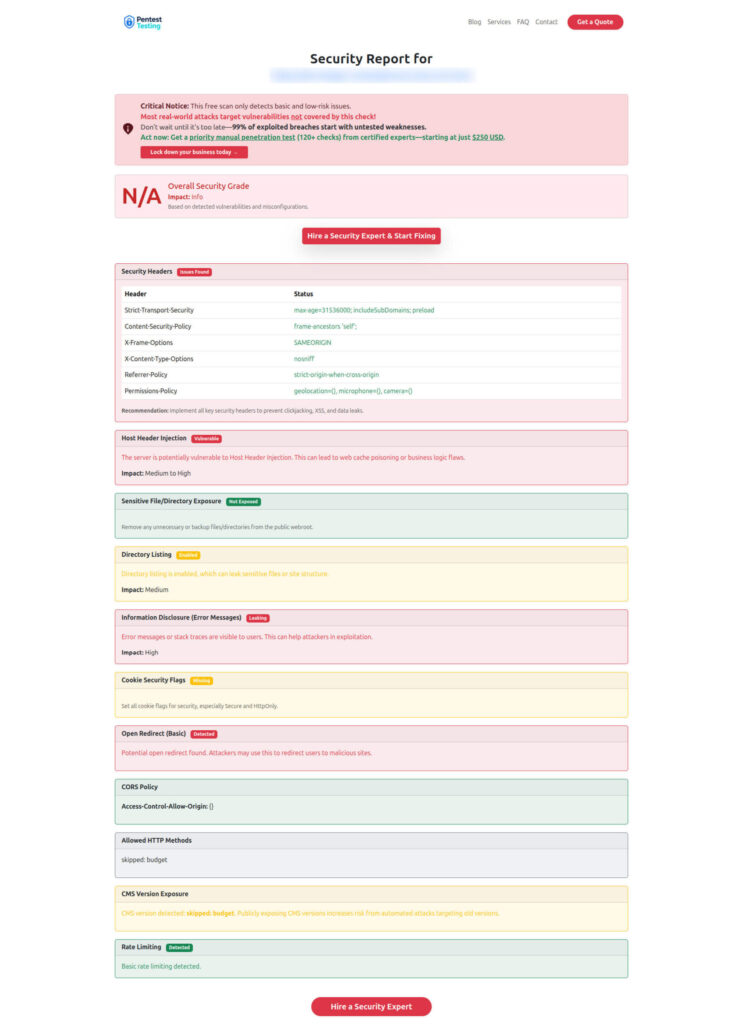
Sample report output to check Website Vulnerability
Compliance synergy: map controls back to audit artifacts
When you implement AI phishing prevention as code, you automatically generate evidence:
- Change history: PR approvals for email/auth/DNS changes.
- Control tests: CI logs proving secrets scanning, policy checks, and security tests ran.
- Runtime evidence: security events showing blocks/step-up actions and why.
- Incident records: runbook timeline + remediation tickets.
Related reading from our Developer Playbook:
- Secrets as Code: 7 Proven Patterns for Rotation, JIT Access & Audit-Ready Logs — https://www.cybersrely.com/secrets-as-code-patterns/.
- Fix a Leaked GitHub Token with 7 Powerful Steps (and Stop It Happening Again) — https://www.cybersrely.com/fix-a-leaked-github-token/.
- 5 Proven CI Gates for API Security: OPA Rules You Can Ship — https://www.cybersrely.com/ci-gates-for-api-security/.
- 7 Powerful PCI DSS 4.0.1 MFA CI/CD Gates — https://www.cybersrely.com/pci-dss-4-0-1-mfa-ci-cd-gates/.
- Feature Flags as Evidence: Turning Release Toggles into SOC 2 & PCI DSS Controls Your Auditors Will Love — https://www.cybersrely.com/feature-flags-as-evidence-win-audits/.
- 5 Proven Ways to Map CI/CD Findings to SOC 2 and ISO 27001 — https://www.cybersrely.com/map-ci-cd-findings-to-soc-2-and-iso-27001/.
- 7 Powerful Tactics for Embedded Compliance in CI/CD — https://www.cybersrely.com/embedded-compliance-in-ci-cd-tactics/.
Where Cyber Rely fits (services engineering teams actually use)
If you want expert help turning these patterns into a sprint-ready rollout:
- Services overview: https://www.cybersrely.com/cybersecurity-services/
- Web app testing (auth + user flows): https://www.cybersrely.com/web-application-penetration-testing/
- API testing (rate limits, authz, abuse paths): https://www.cybersrely.com/api-penetration-testing-services/
- Network testing (exposure paths): https://www.cybersrely.com/network-penetration-testing-services/
- Impersonation risk reduction for public channels: https://www.cybersrely.com/get-a-quote/social-media-security-hardening/
For risk discovery, remediation, or free assessments, explore:
- https://www.pentesttesting.com/risk-assessment-services/
- https://www.pentesttesting.com/remediation-services/
- https://free.pentesttesting.com/
🔐 Frequently Asked Questions (FAQs)
Find answers to commonly asked questions about AI Phishing Prevention.