6 Powerful Security Chaos Experiments for CI/CD
Most engineering orgs already ship CI/CD compliance, supply-chain controls, PQC gates, OPA policies, feature flags as evidence, and secrets-as-code.
The next step isn’t another policy deck—it’s security chaos experiments: tightly scoped, low-risk drills in staging or ephemeral environments that prove your controls behave the way your slideware claims.
This guide shows 6 practical security chaos experiments engineering leaders can run this quarter, with:
- Where to run each experiment (ephemeral envs, branches, timeboxes)
- How to measure MTTD, MTTR, blast radius, and playbook friction
- How to turn results into backlog items, CI/CD gates, and control descriptions for SOC 2, ISO 27001, PCI DSS, and HIPAA.
On Cyber Rely, we focus on experiments engineers can actually ship in CI, not just policy slides.
For deeper patterns and copy-paste pipelines, check these Cyber Rely posts as you go:
- 5 Smart Ways to Map CI/CD Findings to SOC 2 & ISO 27001
- 10 Essential Steps: Developer Playbook for DORA
- Secrets as Code: 7 Proven Patterns for Rotation, JIT Access & Audit-Ready Logs
- 7 Proven Steps: PQC in CI with ML-KEM Gate & CBOM
What are Security Chaos Experiments?
Security chaos experiments are controlled drills that deliberately stress your security controls—without breaking production.
They are not “random breakage”:
- They run in staging / ephemeral environments or tightly scoped prod experiments.
- They are time-boxed, scripted, and revertible.
- They have clear blast-radius limits (non-critical services, test tenants, fake data).
- They produce artifacts: logs, alerts, tickets, metrics, and evidence.
Typical goals:
- Does revoking a secret mid-deploy fail closed or silently degrade?
- If a CI security gate is disabled, do we have a meta-control that notices?
- If logging dies, can we still detect and respond?
These experiments complement pentest & vulnerability assessments. For example, in a recent municipal web-app assessment, SQL injection, XSS, CSRF, security misconfiguration and malicious file upload produced hundreds of findings across OWASP Top 10 categories—the real value came from grouping them into shared control failures and fixing patterns, not URLs.
Chaos experiments stress those same controls continuously through CI/CD.
If you’re implementing PCI DSS 4.0.1 MFA and want a practical CI/CD enforcement blueprint (policy as code, merge-blocking gates, and audit-evidence automation), read this guide: https://www.cybersrely.com/pci-dss-4-0-1-mfa-ci-cd-gates/
Ground Rules Before You Run Security Chaos Experiments
Before we dive into the six experiments, set some baseline guardrails:
- Environments & scope
- Prefer ephemeral preview environments per branch.
- Otherwise, use staging with synthetic traffic and test tenants only.
- Change management
- Track every experiment as a ticket with hypothesis, owner, and rollback.
- Timebox experiments (e.g., 30–60 minutes) and define abort criteria (“if error rate > X% or latency > Y ms, roll back”).
- Metrics
- MTTD: time from injected fault → first detection (alert, dashboard, human).
- MTTR: time from detection → control restored.
- Blast radius: how many services/tenants/users affected.
- Playbook friction: number of manual steps and people involved.
- Evidence outputs
- Export logs, alerts, CI output, and tickets into your evidence bucket (e.g., the same immutable storage you use for SSDF / secure software attestation).
Later, you’ll map these to SOC 2 / ISO 27001 control IDs using the patterns from “5 Smart Ways to Map CI/CD Findings to SOC 2 & ISO 27001”.
Experiment 1: Secret Revoked Mid-Deploy
Goal: Prove that secret rotation and revocation fail safe, and that your monitoring clearly tells you what broke.
Where to run it
- Environment: Staging or ephemeral env with no real customer data.
- Scope: One non-critical service that uses a secrets manager (e.g., AWS Secrets Manager, GCP Secret Manager, Vault).
Chaos setup
Idea: During a deployment, rotate or revoke a secret (API key, DB password, token) and watch what happens.
GitHub Actions example – rotate a staging API key and deploy:
name: chaos-secret-revocation
on:
  workflow_dispatch:
    inputs:
      rotate_secret:
        description: "Rotate staging API key before deploy?"
        required: true
        default: "true"

jobs:
  chaos-secret-test:
    runs-on: ubuntu-latest
    env:
      STAGE_SECRET_ID: "staging/app-api-key"
    steps:
      - uses: actions/checkout@v4

      - name: Rotate API key in secrets manager (staging only)
        if: ${{ github.event.inputs.rotate_secret == 'true' }}
        run: |
          NEW_VALUE=$(uuidgen)
          aws secretsmanager update-secret \
            --secret-id "$STAGE_SECRET_ID" \
            --secret-string "$NEW_VALUE"

      - name: Deploy to staging
        run: ./scripts/deploy-staging.sh

      - name: Run smoke tests
        run: ./scripts/smoke.sh
Service-side defensive pattern (Node.js example):
// fail closed if secret missing
import { getSecretOrThrow } from "./secrets";

async function createClient() {
  const apiKey = await getSecretOrThrow("PAYMENTS_API_KEY");
  return new PaymentsClient({ apiKey });
}
// secrets.ts
export async function getSecretOrThrow(name: string): Promise<string> {
const value = await secretsManager.getSecretValue(name);
if (!value) {
throw new Error(`Secret ${name} missing; refusing to start`);
}
return value;
}What to measure
- MTTD: How long from rotation → first alert?
- You want alerts on:
- Deployment failures
- Increased 5xx rate
- Specific auth errors (“401 from payments API”)
- You want alerts on:
- MTTR: How long to restore a working secret and pass smoke tests?
- Blast radius:
- Did only this service break, or did cascading failures appear upstream?
- Playbook friction:
- How many steps and people to restore?
- Are runbooks clear enough for on-call engineers?
Backlog & controls
Turn outcomes into:
- Backlog items
- Add “fail closed if secret is missing/invalid” in service startup.
- Add synthetic checks that validate critical secrets pre-deploy.
- Control description
- “Secrets are stored in a centralized secrets manager. Services fail closed on missing/invalid secrets, and rotation events are monitored via automated health checks and alerts. Secret revocation chaos drills are run quarterly.”
Tie this to risk registers and assurance (SOC 2 CC6.x, ISO 27001 A.8/A.9) via your Risk Assessment Services.
When recurring issues show up (e.g., services silently reconnect with old credentials), turn them into a formal risk entry using [Risk Assessment Services for HIPAA, PCI DSS, SOC 2, ISO & GDPR] on Pentest Testing Corp’s site.
Experiment 2: Expired or Mis-Issued TLS Cert in a Non-Critical Service
Goal: Ensure TLS failures are visible, and that clients behave safely when certs expire or mismatch.
Where to run it
- Environment: Staging gateway / internal microservice.
- Scope: Non-critical service behind your API gateway.
Chaos setup
Create a test service with an intentionally bad certificate (expired, wrong hostname, or wrong CA).
docker-compose snippet for a bad TLS endpoint:
version: "3.9"
services:
  bad-tls-service:
    image: nginx:alpine
    volumes:
      - ./chaos/nginx.conf:/etc/nginx/nginx.conf:ro
      - ./chaos/certs/expired.crt:/etc/nginx/certs/server.crt:ro
      - ./chaos/certs/server.key:/etc/nginx/certs/server.key:ro
    ports:
      - "8443:443"
Client-side, assert strict TLS:
import https from "https";

const agent = new https.Agent({
  rejectUnauthorized: true, // never turn this off in real apps
});

async function callBadService() {
  try {
    await fetch("https://bad-tls-service.internal/api", { agent });
  } catch (err) {
    // ensure we log clearly and surface metrics
    logger.error({ err }, "TLS connection failed to bad-tls-service");
    throw err;
  }
}
What to measure
- MTTD:
- Do you get alerts for failed health checks, TLS errors, or SLO burn?
- MTTR:
- How quickly can a cert be replaced (automation vs manual)?
- Blast radius:
- Did only this traffic path fail, or did retries overload another service?
- Playbook steps:
- Is cert rotation automated (ACME, cert-manager) or ticket-driven?
Backlog & controls
- Backlog
- Automate certificate renewal for all ingress points.
- Add CI checks that reject adding endpoints without TLS monitoring.
- Control description
- “All external endpoints enforce TLS with automated renewal and monitoring. TLS failure chaos experiments are run to validate alerts, fail-closed behavior, and playbooks.”
For real-world TLS gaps, a web app pentest & risk assessment often surfaces misconfigured TLS and weak cipher suites as part of an OWASP Top 10 mapping.
Use Risk Assessment Services to map these into your formal risk register, and Remediation Services to drive implementation and evidence.
Experiment 3: Mis-Tagged Data (Wrong Tenant/Project) in Staging
Goal: Prove your data lineage and access controls catch tenant or project mis-tags before they leak data.
Where to run it
- Environment: Staging DB with synthetic tenants.
- Scope: One multi-tenant service (e.g., SaaS app, analytics platform).
Chaos setup
Inject deliberately mis-tagged records—for example, user data for Tenant A with tenant_id = B.
Example seed script:
-- chaos_mistagged_data.sql
INSERT INTO invoices (id, tenant_id, customer_email, amount)
VALUES (
  gen_random_uuid(),
  'tenant-b',                -- WRONG tenant
  '[email protected]',
  4200
);
Run via CI:
name: chaos-mistagged-data
on:
  workflow_dispatch:

jobs:
  inject-mistagged-records:
    runs-on: ubuntu-latest
    steps:
      - uses: actions/checkout@v4
      - name: Apply chaos SQL to staging DB
        env:
          DATABASE_URL: ${{ secrets.STAGING_DB_URL }}
        run: |
          psql "$DATABASE_URL" -f chaos/chaos_mistagged_data.sql
      - name: Run multi-tenant access tests
        run: npm test -- --runInBand tenant-access.spec.ts
Add a test that tries to read that record from Tenant A’s context and asserts “not found”.
it("never leaks Tenant A data when tagged as Tenant B", async () => {
  const client = await makeClient({ tenantId: "tenant-a" });
  const res = await client.get("/[email protected]");
  expect(res.body.items).toHaveLength(0);
});
What to measure
- MTTD: Do monitoring or anomaly detection notice cross-tenant anomalies?
- MTTR: When mis-tagging is detected, how quickly can it be corrected and prevented in code?
- Blast radius: How many tables/services are impacted by a single mis-tag?
- Playbook steps: Do you have a clear “data incident” runbook?
Backlog & controls
- Backlog
- Add row-level constraints (e.g., FK to
tenantstable + invariants in application code). - Introduce tenant-aware logging and audit events.
- Add row-level constraints (e.g., FK to
- Control description
- “Multi-tenant data is protected by row-level constraints, tenant-scoped authorization checks, and anomaly detection for mis-tagged records. Chaos experiments validate that mis-tagged data is not exposed.”
Map resulting findings to access control & data protection controls in SOC 2 and ISO through your risk register.
Experiment 4: Disabled CI Security Gate (SAST/DAST/KEV Gate)
Goal: Verify that no one can silently disable or skip critical security jobs in your CI pipeline.
Where to run it
- Environment: Any non-prod branch/pipeline.
- Scope: A representative pipeline with SAST/DAST/SCA/IaC jobs and a KEV-based “fail on known exploited vulns” gate.
Chaos setup
Simulate someone commenting out or skipping a required security job, and enforce a meta-gate with policy-as-code (OPA/Rego).
Simplified input to OPA (JSON):
{
  "completed_jobs": ["build", "unit-tests"],
  "required_security_jobs": ["sast", "sca", "dast"]
}
Rego policy:
package cicd.gates

deny[msg] {
  some job in input.required_security_jobs
  not job_completed(job)
  msg := sprintf("Required security job %s missing or skipped", [job])
}

job_completed(job) {
  job == input.completed_jobs[_]
}
GitHub Actions step enforcing the gate:
  - name: Enforce security job meta-gate
    run: |
      cat >input.json <<'EOF'
      {
        "completed_jobs": ["build", "unit-tests"],
        "required_security_jobs": ["sast", "sca", "dast"]
      }
      EOF

      opa eval \
        --input input.json \
        --data policy.rego \
        "data.cicd.gates.deny" | tee result.txt

      if grep -q "Required security job" result.txt; then
        echo "Meta-gate failed: required security jobs missing"
        exit 1
      fi
In your chaos branch, comment out the sast job and confirm this gate fails.
What to measure
- MTTD: Who notices first—OPA gate, build badge, humans?
- MTTR: Is fixing as simple as restoring the job, or are there hidden dependencies?
- Blast radius: Would a missing job affect all services or just one repo?
- Playbook steps: Do you have a change control process for disabling gates (approvals, RFC, time-bound waivers)?
Backlog & controls
- Backlog
- Add policy checks for required jobs, min code coverage, evidence upload, etc.
- Centralize gate definitions (templates, reusable workflows).
- Control description
- “Security jobs (SAST/DAST/SCA/KEV) are mandatory and enforced via policy-as-code. Attempts to disable them are blocked by CI meta-gates and logged as exceptions.”
For mapping these gates to auditors’ language, see “5 Smart Ways to Map CI/CD Findings to SOC 2 & ISO 27001” on the Cyber Rely blog.
Experiment 5: Simulated Compromised CI Runner
Goal: Test how well you isolate CI runners, protect secrets, and limit the blast radius if a runner is compromised—something that recent supply-chain incidents have made painfully real.
Where to run it
- Environment: Dedicated staging runner pool (self-hosted or ephemeral cloud runners).
- Scope: One pipeline with access to a limited set of staging resources.
Chaos setup
Simulate a runner behaving maliciously by attempting to exfiltrate secrets and reach internal networks. The point is not to actually leak anything, but to see what would be possible with your current isolation.
Example “malicious” job:
  compromised-runner-sim:
    runs-on: self-hosted-chaos
    steps:
      - name: List env vars (sanitized in real drill)
        run: env | sort

      - name: Attempt to reach internal metadata and DB
        run: |
          echo "Trying cloud metadata..."
          curl -m 2 http://169.254.169.254 || echo "blocked"
          echo "Trying internal DB..."
          nc -vz db.internal 5432 || echo "no access"

      - name: Attempt to read mounted credentials
        run: |
          ls -R /mnt || echo "no mounts"
Then harden:
- Run on ephemeral VMs/containers.
- No direct network route to prod networks.
- Use OIDC + short-lived tokens instead of long-lived secrets.
What to measure
- MTTD: Do you have detections for “CI runner touching metadata service” or “unexpected internal port scans”?
- MTTR: How fast can you revoke runner credentials and rotate impacted secrets?
- Blast radius: Could this runner reach:
- Prod DBs
- Internal admin panels
- Artifact registry
- Playbook steps: Do you have a CI compromise incident playbook?
Backlog & controls
- Backlog
- Enforce ephemeral runners for high-risk pipelines.
- Lock down network egress (only allow build tools, package registries, etc.).
- Move secrets to per-job OIDC tokens where possible.
- Control description
- “CI runners are ephemeral, least-privileged, and network-isolated. Compromise simulations verify that secrets and internal systems remain protected.”
Use Risk Assessment Services to document this as a scenario in your formal threat model and risk register, and Remediation Services to prioritize hardening work where the blast radius is highest.
Experiment 6: Chaos on Logging & Alerting
Goal: Understand what happens when logging or alerting partially fails—and whether you notice before an attacker does.
Where to run it
- Environment: Staging observability stack (log pipeline, metrics, alerting).
- Scope: One application’s logs and alerts.
Chaos setup
Simulate a log sink or alerting path failure.
Example: disable a log forwarder in staging:
# chaos_disable_log_shipping.sh
kubectl scale deploy/log-forwarder-staging --replicas=0 -n observability
Run from CI:
name: chaos-logging
on:
  workflow_dispatch:

jobs:
  disable-log-shipping:
    runs-on: ubuntu-latest
    steps:
      - name: Disable log forwarder in staging
        run: ./scripts/chaos_disable_log_shipping.sh

      - name: Generate synthetic app traffic
        run: ./scripts/generate_traffic.sh
In parallel, have a dashboard showing:
- App logs volume
- Error rates
- Alert counts
You want an alert like “Logging pipeline unavailable for service X” within minutes.
What to measure
- MTTD: How quickly do you detect loss of logs or alerts?
- MTTR: How fast can you restore the pipeline and validate it?
- Blast radius: Is only one service affected, or the entire environment?
- Playbook steps: Do you have runbooks for observability outages?
Backlog & controls
- Backlog
- Add meta-monitoring for your logging and alerting stack.
- Introduce synthetic alerts (canary errors) that must be seen end-to-end.
- Control description
- “Logging and alerting are monitored as critical services. Chaos experiments validate we can detect and recover from observability failures quickly.”
- For concrete ideas on strengthening logging before your DORA-style drills, cross-reference your experiments with guidance from developer-focused posts on logging and incident response on the Cyber Rely blog.
Turning Chaos Results into Risk Registers & Remediation Programs
Running security chaos experiments is only half the work. The value comes from how you convert results into artifacts auditors and customers trust.
- Create or update your risk register When an experiment reveals a systemic gap (e.g., “no meta-control for disabled SAST jobs”), add a risk entry such as:
- Risk: “Security gates can be disabled without detection.”
- Impact: Regulated data breach; control failure vs SOC 2 CC 7.2 / ISO A.8.16.
- Treatment: Implement CI meta-gates + change control.
- Bundle fixes into a remediation program Instead of scattered tickets, group related fixes into a single program per theme (Secrets, TLS, CI/CD, Runners, Logging).
- Each program gets:
- OwnerTarget datesSuccess criteria (MTTD/MTTR targets, coverage, evidence)
- Each program gets:
- Collect evidence like an auditor would Inspired by Cyber Rely’s SSDF 1.1 CI/CD attestation guide, treat each chaos experiment as a repeatable evidence factory: run, capture pipeline logs, screenshots, and tickets, then store them in an immutable evidence bucket per quarter.
Using the Free Website Vulnerability Scanner as Chaos Input
You don’t have to hand-craft every test case. You can feed your security chaos experiments with findings from an automated surface scan.
Free Website Vulnerability Scanner: where it fits
Start with a light, non-intrusive scan of your staging or test environment using the Free Website Vulnerability Scanner at free.pentesttesting.com.
Typical findings include:
- Reflected / stored XSS
- SQL injection & other injection risks
- Security misconfiguration (server banners, default files)
- Weak session management and missing CSRF defenses
You can then:
- Turn those findings into inputs for your chaos scenarios (e.g., “what if this XSS is exploited while logging is degraded?”).
- Verify that your CI/CD gates actually catch these issues before they hit prod.
Free Website Vulnerability Scanner Dashboard
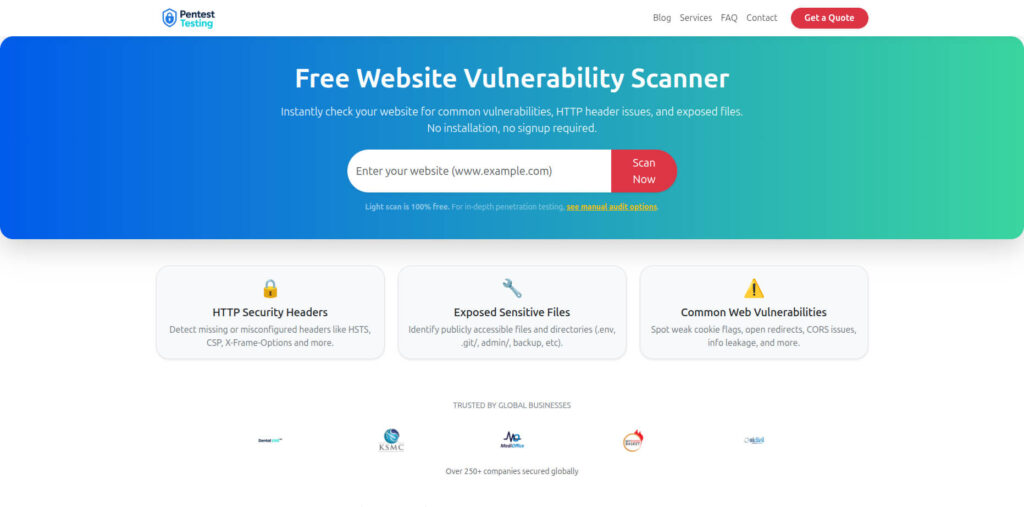
Sample Assessment Report to check Website Vulnerability
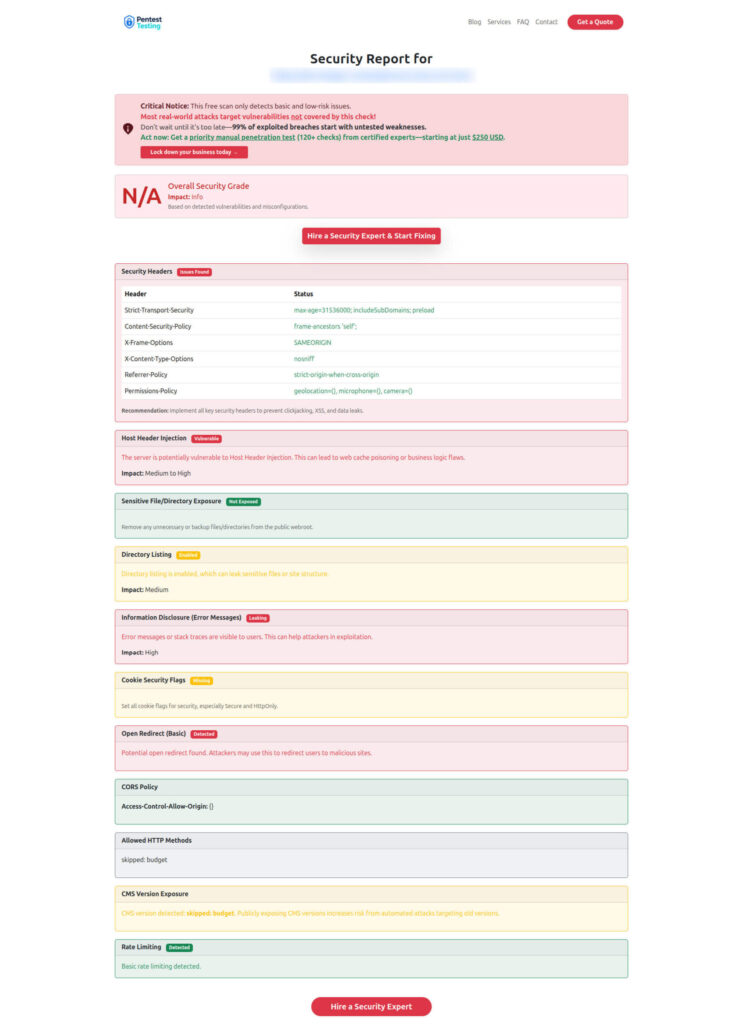
This approach mirrors how full web-application penetration testing reports map vulnerabilities to OWASP Top 10 and SANS Top 25 and summarize counts by severity to drive mitigation.
Related Cyber Rely Blogs
Within the Cyber Rely ecosystem, consider adding internal links like:
- Deeper CI/CD patterns: “For more dev-ready CI/CD patterns, see the Cyber Rely Blog.”
- Vulnerability & Threat Response posts relevant to chaos:
From there, you can layer in more advanced security chaos experiments until CI/CD becomes not just a delivery engine, but your strongest security control.
🔐 Frequently Asked Questions (FAQs)
Find answers to commonly asked questions about Security Chaos Experiments in CI/CD.