9 Powerful Secure Feature Flags to Stop Abuse
Feature flags (aka flags in production) let teams ship faster: dark launches, gradual rollouts, experiments, kill switches, and decoupled deploys. But they also create a new security surface that rarely gets the same rigor as “normal” authz, config, or release engineering.
In real incidents, feature flags fail in predictable ways:
- A “hidden” admin-only capability gets enabled without the right identity gate.
- A flag becomes a permanent dependency and turns into a shadow permission system.
- A client-controlled input (header/cookie/query param) becomes an unintended toggle (feature flag injection).
- Rollback is possible—but you can’t answer who changed what, when, and what it impacted.
This guide shows how engineering leaders can design secure feature flags that prevent abuse and logic-based vulnerabilities—without slowing delivery.
1) The rise of feature flags—and the risk surfaces they introduce
Feature flags are now used for far more than experiments:
- Authorization-adjacent behaviors (“allow export”, “enable privileged UI”, “bypass review queue”)
- Billing/entitlement logic
- Data handling changes (masking, encryption, retention)
- Backdoors-by-accident (“temporary debug mode”)
The risk: flags quietly become production control points with weaker review, weaker logging, and weaker access controls than your “real” security boundaries.
If you treat flags as “just config,” you’ll eventually ship a logic path that attackers can steer.
2) Common threat patterns
A) Unauthorized toggling
Attackers (or compromised accounts) flip flags to unlock privileged functionality.
Root causes
- Flag admin UI isn’t strongly protected (weak RBAC, no MFA, shared accounts)
- No approval workflow for high-impact flags
- No environment scoping (prod toggle available to too many people)
B) Feature flag injection
A request-controlled value becomes a toggle:
?feature=newCheckout=1X-Enable-Feature: true- Cookie-based “experiments” reused as authorization decisions
C) Stale flag dependencies
Flags that never die become permanent branches:
- Hidden behavior differences by cohort
- Old code paths never exercised in tests
- “Temporary bypass” becomes “forever bypass”
3) Safeguards: guardrails you can ship immediately
Guardrail 1: Define a flag manifest with owners, TTL, scope, and risk
Make every flag carry governance metadata (and enforce it in CI).
# flags.yaml
flags:
  - key: "checkout.new_flow"
    owner: "team-payments"
    risk: "high"               # low | medium | high
    description: "New checkout flow behind gated rollout"
    environments: ["dev", "staging", "prod"]
    default: false
    expires_at: "2026-04-30"   # TTL: flags must die
    allowed_scopes:
      - "tenant:paid"
      - "cohort:beta"
    enforcement:
      require_server_side_eval: true
      require_change_ticket: true
      require_2_person_approval: true
Guardrail 2: Never let the client decide flags that change authorization
Client-side flags are fine for UX experiments—but not for privileged behaviors.
Bad pattern (injection-prone):
// ❌ Do not do this
const enableAdminExport = req.query.export === "1";
if (enableAdminExport) exportAllTenants();
Good pattern (server-side evaluation + authz):
// ✅ Flag is only one input; authz is still required
if (flags.isEnabled("admin.bulk_export", ctx)) {
  requirePermission(ctx.user, "tenant.export");
  exportTenant(ctx.tenantId);
}
Guardrail 3: Couple flags with identity “gates”
A secure feature flag evaluation should always include context:
user_id(or stable principal id)tenant_idroles/permissionsenvironmentrequest_id / trace_id
export type FlagContext = {
  env: "dev" | "staging" | "prod";
  userId: string;
  tenantId: string;
  roles: string[];
  requestId: string;
  ip?: string;
};

export function canSeeFlag(flagKey: string, ctx: FlagContext): boolean {
  // Example: never expose high-risk flags to clients
  return !(flagKey.startsWith("admin.") && !ctx.roles.includes("admin"));
}
Guardrail 4: Add scopes + TTLs, and enforce “flag death”
Flags without TTLs become permanent risk.
CI gate example (fails builds when flags are expired):
#!/usr/bin/env bash
set -euo pipefail

python3 - <<'PY'
import sys, yaml
from datetime import datetime, timezone

doc = yaml.safe_load(open("flags.yaml", "r"))
now = datetime.now(timezone.utc).date()

expired = []
for f in doc.get("flags", []):
  exp = f.get("expires_at")
  if exp:
    d = datetime.fromisoformat(exp).date()
    if d < now:
      expired.append(f["key"])

if expired:
  print("Expired flags found:")
  for k in expired:
    print(f" - {k}")
  sys.exit(1)
print("Flag TTL check passed.")
PY
4) Secure feature flag rollout guardrails (practical)
A) Two-person approval for high-risk flags
Treat high-impact flags like production access:
- Required reviewers
- Mandatory change ticket
- Break-glass path with extra logging
B) Environment isolation
Prod flags must be managed separately from dev/staging.
# Example: enforce who can change prod
prod_permissions:
  allowed_groups:
    - "release-managers"
    - "security"
  require_mfa: true
  require_justification: true
C) Safe defaults: “deny by default”
When the flag service is down, what happens?
- High-risk: default to OFF
- Kill switch: default to ON (only if it reduces risk)
const enabled = await flags.safeIsEnabled("checkout.new_flow", ctx, { default: false });5) Testing strategies: chaos experiments + negative tests for flags
A) Negative tests for unauthorized toggling
Write tests that prove a user cannot “toggle by input.”
import request from "supertest";
import { app } from "../app";

test("cannot inject flag via header", async () => {
  await request(app)
    .get("/api/checkout")
    .set("X-Enable-Feature", "checkout.new_flow=true")
    .expect(200)
    .then(res => {
      expect(res.text).not.toContain("New Checkout Flow Enabled");
    });
});
B) Property-based tests for “flag invariants”
If a flag controls sensitive behavior, encode invariants:
- “Without permission X, action Y must never succeed—regardless of flags.”
function assertInvariant(ctx: FlagContext) {
  const canExport = ctx.roles.includes("admin");
  // invariant: export requires admin
  if (!canExport) {
    expect(() => exportAllTenants()).toThrow();
  }
}
C) Chaos experiments: simulate flag service failure
Flags must fail safely under dependency issues.
test("flag provider outage fails safe", async () => {
  flags.simulateOutage(true);
  const enabled = await flags.safeIsEnabled("admin.bulk_export", ctx, { default: false });
  expect(enabled).toBe(false);
});
6) Real-time enforcement: policy engines, centralized governance, audit streams
A) Centralize governance: “flags as code”
Store flags in a repo (PR-reviewed), then publish to runtime.
- Version-controlled changes
- Required approvals
- Automated validation (TTL, scope, naming)
B) Policy engine enforcement (example: OPA/Rego-style)
Use a policy layer to decide who can change flags and who can receive them.
package flags.authz

default allow_change = false

# Only release-managers can change prod flags
allow_change {
  input.env == "prod"
  "release-managers" in input.actor.groups
  input.flag.risk == "high"
  input.approvals >= 2
}
C) Emit immutable audit events
Every change should produce an append-only audit record:
{
  "event": "flag.changed",
  "flag_key": "checkout.new_flow",
  "env": "prod",
  "actor_id": "u_18372",
  "actor_groups": ["release-managers"],
  "before": false,
  "after": true,
  "reason": "Rollback mitigation window",
  "change_id": "chg_9f2c1",
  "request_id": "req_aa12",
  "ts": "2026-02-19T10:22:11Z"
}
7) Observability + forensic readiness for feature flags
Secure feature flags aren’t just about prevention; they’re about explainability during incidents.
Log (or audit) these at minimum:
- Flag key + variant
- Evaluation reason (rule matched)
- Actor + tenant
- Invocation context (service name, build version)
- Trace/request correlation
logger.info("flag.evaluated", {
  flagKey,
  enabled,
  reason,
  tenantId: ctx.tenantId,
  userId: ctx.userId,
  requestId: ctx.requestId,
  service: process.env.SERVICE_NAME,
  build: process.env.BUILD_SHA,
});
If you’re designing broader investigation-ready telemetry, Cyber Rely has recent deep dives worth keeping nearby:
- Forensics-ready telemetry patterns and what to log for “who changed what.”
- Forensics-ready microservices patterns for correlating identity + changes end-to-end.
8) Post-incident playbook: rollback, audit, impacted scope analysis
When a flag is abused (or suspected), speed matters.
Step 1: Roll back safely
- Turn off the flag (or revert to safe variant)
- Confirm fail-safe defaults are effective
- Freeze further changes (temporary governance lock)
Step 2: Audit who/what/when
Query audit stream by flag_key + time window and enumerate:
- Actor identities
- Source IP / device posture (if available)
- Approval trail
- All environments affected
Step 3: Identify impacted scope
You need to answer:
- Which tenants/users saw the behavior?
- Which requests executed the flagged path?
- Which downstream services were involved?
Example “impact query” shape (your storage may differ):
SELECT tenant_id, COUNT(*) as hits
FROM audit_flag_evaluations
WHERE flag_key = 'checkout.new_flow'
  AND enabled = true
  AND ts BETWEEN '2026-02-19T00:00:00Z' AND '2026-02-19T23:59:59Z'
GROUP BY tenant_id
ORDER BY hits DESC;
Step 4: Patch the root cause
- If injection occurred: remove client-controlled toggles immediately
- If unauthorized change occurred: tighten RBAC + approval + MFA
- If stale dependency: remove the flag and delete dead paths
If you need structured help across risk, fixes, and incident validation, you can route readers to:
9) Free tool + Sample report
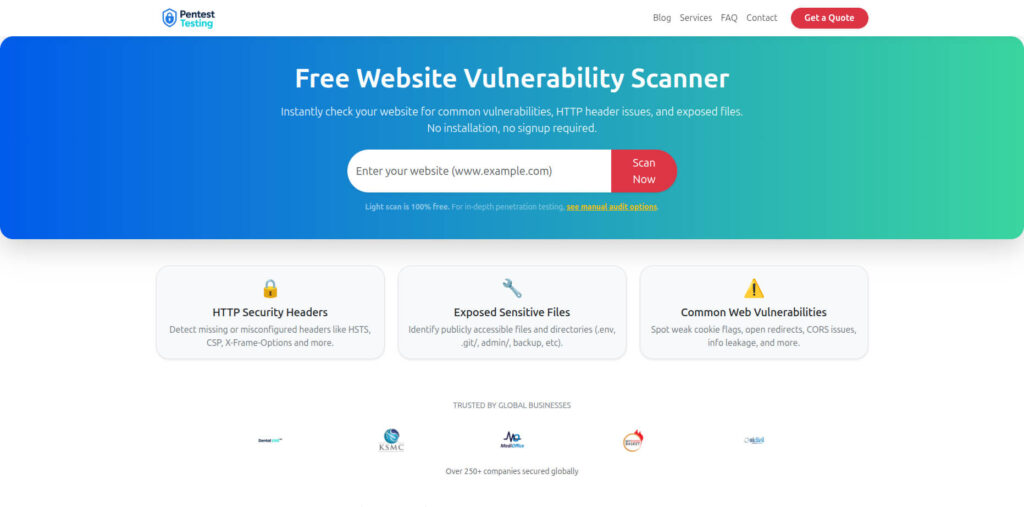
Free Website Vulnerability Scanner tool by (Pentest Testing Corp)
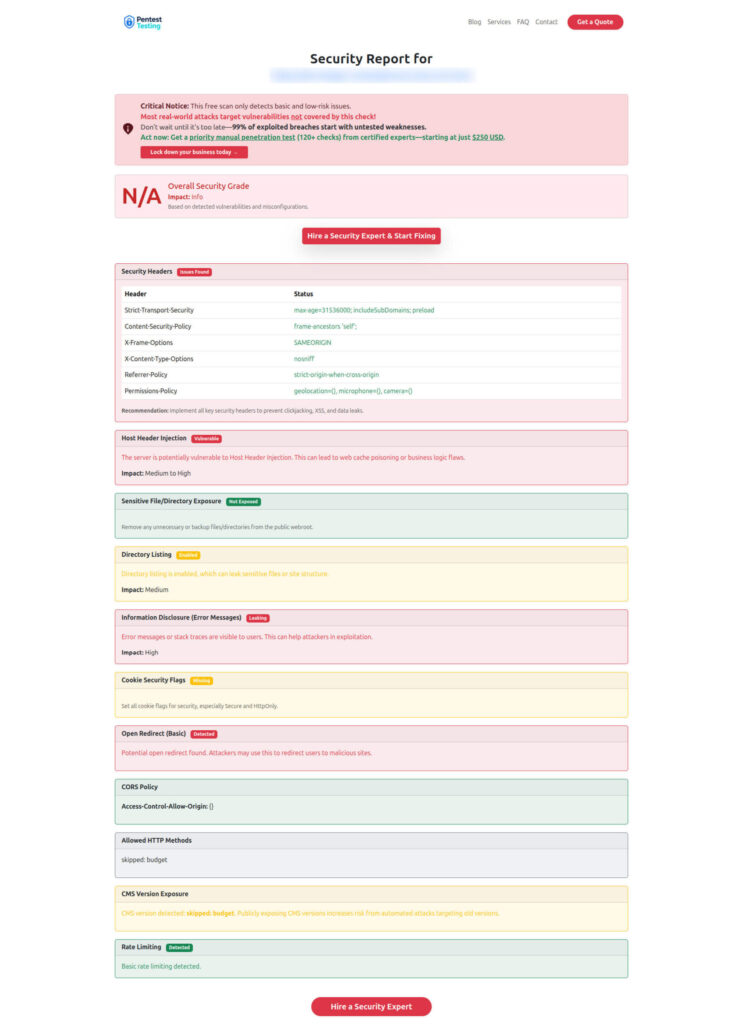
Sample report (from the tool) to check Website Vulnerability
Implementation checklist (copy/paste)
- All sensitive flags are server-side evaluated
- Flag manifest includes owner + risk + TTL + scope
- CI fails on expired flags and invalid metadata
- Prod flag changes require MFA + approvals + justification
- Audit stream records before/after + actor + request correlation
- Negative tests cover injection attempts (headers/cookies/query params)
- Chaos tests validate fail-safe behavior during outages
- Post-incident playbook exists for rollback + impact analysis
Recent Cyber Rely reads (internal)
If you want adjacent engineering-first patterns (governance, auditability, and runtime control), these recent posts pair well with secure feature flags: (Cyber Rely)
- Secure Cloud-Native Secrets Management Wins
- Zero Trust Egress Controls for Microservices
- 7 Powerful Fixes for Prompt Injection (Reprompt)
- Forensics-Ready Telemetry Patterns
- Forensics-Ready Microservices Design Patterns
- 9 Battle-Tested Non-Human Identity Security Controls
- Software Supply Chain Security Tactics
🔐 Frequently Asked Questions (FAQs)
Find answers to commonly asked questions about Secure Feature Flags.