Secure Secrets in a Cloud-Native World: Beyond Vaults and Env Files
Cloud-native teams don’t lose secrets because they don’t own a secrets manager. They lose secrets because credentials quietly spread across containers, CI/CD, logs, Helm values, build caches, and “temporary” debug paths—and nobody can answer, confidently:
- Who accessed which secret, when, from where, and why?
- How fast can we rotate without breaking production?
- Do pipelines and workloads use identity… or static credentials?
This guide is an engineering-first playbook for cloud-native secrets management across Kubernetes, microservices, and CI/CD—focused on short-lived access, workload identity security, secure secret rotation, and forensics-ready audit trails.
Looking for a practical checklist to reduce feature flag risks in production? Read: Secure Feature Flags: Preventing Abuse and Logic-Based Vulnerabilities
https://www.cybersrely.com/secure-feature-flags-prevent-abuse/
1) Why traditional secret storage fails in dynamic environments
The usual “works in dev” patterns that break at scale
- Env files /
.env: copied into multiple places, hard to rotate, easy to leak in support bundles. - Kubernetes Secrets as a “vault”: often treated like a database, then read broadly via RBAC.
- Secrets baked into images: impossible to rotate safely and reliably.
- CI variables used as long-lived keys: the fastest path to mass compromise when a runner or repo is breached.
Cloud-native secrets management requires two mind shifts:
- Identity first: workloads prove who they are using workload identity, not static keys.
- Lifetime and scope first: secrets are short-lived and tightly scoped to one service + one purpose.
2) Threats that actually bite teams (and how secrets get stolen)
A practical threat list (what pentests and incident response keep finding)
- Unauthorized access: over-broad IAM and Kubernetes RBAC lets “one service” read “all secrets.”
- Secret sprawl: multiple copies across repos, Helm charts, CI variables, runbooks, tickets.
- Container escapes / node compromise: attackers pivot from a pod to harvest mounted secrets.
- CI/CD leaks: PR workflows, artifact logs, caches, misconfigured masking, compromised runners.
- Observability leaks: secrets accidentally logged as headers, query params, or debug payloads.
A strong baseline assumes breach of one workload and focuses on blast-radius reduction.
3) Design patterns that work (short-lived, service-bound, identity-based)
Pattern A — Prefer workload identity over static credentials
Workloads should authenticate using platform identity:
- Kubernetes ServiceAccount → identity provider → scoped access
- No shared cloud keys inside pods
- No “one CI token to rule them all”
Kubernetes ServiceAccount (scoped + dedicated):
apiVersion: v1
kind: ServiceAccount
metadata:
  name: payments-api
  namespace: prod
automountServiceAccountToken: true
RBAC: allow only what’s needed (example: read one Secret in one namespace):
apiVersion: rbac.authorization.k8s.io/v1
kind: Role
metadata:
  name: payments-secret-reader
  namespace: prod
rules:
  - apiGroups: [""]
    resources: ["secrets"]
    resourceNames: ["payments-db"]
    verbs: ["get"]
---
apiVersion: rbac.authorization.k8s.io/v1
kind: RoleBinding
metadata:
  name: payments-secret-reader-binding
  namespace: prod
subjects:
  - kind: ServiceAccount
    name: payments-api
    namespace: prod
roleRef:
  kind: Role
  name: payments-secret-reader
  apiGroup: rbac.authorization.k8s.io
Pattern B — Use short-lived tokens (minutes, not months)
Aim for:
- CI credentials valid for one job
- Runtime tokens valid for 15–60 minutes
- Automatic renewal only when absolutely required
Pattern C — Service-bound secrets (separate by app, env, purpose)
A naming convention you can enforce:
secret/<team>/<app>/<env>/<purpose>Examples:
secret/payments/api/prod/dbsecret/payments/api/prod/stripesecret/payments/worker/prod/queue
Pattern D — Fetch at runtime (not build time)
If a secret is present during the build, it will eventually end up in:
- build logs
- caches
- artifacts
- docker layers
- dependency proxies
4) Tools and controls (Vault, KMS, Kubernetes Secrets—used correctly)
A) Kubernetes Secrets with encryption at rest (baseline)
Enable encryption at rest for Secrets in etcd (illustrative config):
# encryption-config.yaml (illustrative)
apiVersion: apiserver.config.k8s.io/v1
kind: EncryptionConfiguration
resources:
  - resources:
      - secrets
    providers:
      - kms:
          name: kms-provider
          endpoint: unix:///var/run/kmsplugin/socket.sock
          cachesize: 1000
          timeout: 3s
      - aescbc:
          keys:
            - name: key1
              secret: BASE64_ENCODED_32_BYTE_KEY_MATERIAL
- identity: {}Important: encryption at rest does not fix over-broad RBAC. Treat it as table-stakes.
B) Vault pattern: Kubernetes auth + policy + agent delivery
Vault policy (least privilege to one path):
# payments-api-policy.hcl
path "secret/data/payments/prod/db" {
  capabilities = ["read"]
}
Vault role binding (Kubernetes auth):
# illustrative commands
vault auth enable kubernetes

vault write auth/kubernetes/role/payments-api \
  bound_service_account_names=payments-api \
  bound_service_account_namespaces=prod \
  policies=payments-api-policy \
  ttl=30m
Vault Agent template → write a file your app reads (keeps secrets out of env vars):
# agent.hcl (illustrative)
auto_auth {
  method "kubernetes" {
    mount_path = "auth/kubernetes"
    config = {
      role = "payments-api"
    }
  }
  sink "file" {
    config = { path = "/vault/token" }
  }
}

template {
  source      = "/vault/templates/db-creds.tmpl"
  destination = "/vault/secrets/db.json"
}
Template file:
{{- with secret "secret/data/payments/prod/db" -}}
{"username":"{{ .Data.data.username }}","password":"{{ .Data.data.password }}"}
{{- end -}}
App reads a local file (Node.js):
import fs from "fs";

export function loadDbCreds() {
  const raw = fs.readFileSync("/vault/secrets/db.json", "utf8");
  const { username, password } = JSON.parse(raw);
  return { username, password };
}
C) Cloud KMS pattern: envelope encryption for app-stored secrets
If you must store encrypted secrets in a DB/config store, use envelope encryption:
# envelope_encrypt.py (illustrative)
import os, base64, json
from cryptography.hazmat.primitives.ciphers.aead import AESGCM

def encrypt_with_data_key(plaintext: bytes, data_key: bytes) -> dict:
    aesgcm = AESGCM(data_key)
    nonce = os.urandom(12)
    ct = aesgcm.encrypt(nonce, plaintext, associated_data=b"payments/prod")
    return {
        "nonce": base64.b64encode(nonce).decode(),
        "ciphertext": base64.b64encode(ct).decode(),
    }

# NOTE: In real deployments, fetch data_key from your KMS (wrapped/unwrapped),
# never hardcode it.
5) Runtime defenses: rotation automation + anomaly detection + audit logs
Rotation-as-code (don’t rotate by “Slack message”)
A rotation pipeline should:
- generate new secret
- update backend (Vault/KMS/secret store)
- roll workloads safely
- verify health
- emit evidence (who/what/when/version)
Kubernetes rollout after secret update:
# Example: force restart to re-read mounted secrets (one option)
kubectl -n prod rollout restart deploy/payments-api
kubectl -n prod rollout status deploy/payments-api
Detect abnormal secret usage (simple starting signals)
- Secret reads spike outside deployment windows
- Reads from new namespaces / identities
- Reads from unusual geo/IP ranges (for CI or admin access)
- Reads followed by privilege changes or unusual egress
Vault audit logs (turn logs into evidence)
Make sure audit logs capture:
- identity (service account / workload / CI job)
- secret path accessed
- time window
- request ID / correlation ID
- outcome (success/fail)
6) CI/CD secrets hardening (fetch securely in build/test/deploy)
Rule: CI should not “store secrets,” it should request secrets
The gold standard: CI job uses OIDC (job identity) to request short-lived access, then fetches what it needs.
GitHub Actions (illustrative: identity-based credentials + deploy):
name: deploy-prod
on: [push]

permissions:
  contents: read
  id-token: write

jobs:
  deploy:
    runs-on: ubuntu-latest
    steps:
      - name: Checkout
        uses: actions/checkout@v4

      # Use workload identity / OIDC to obtain short-lived credentials (provider-specific)
      - name: Configure cloud credentials (JIT)
        run: |
          echo "Obtain short-lived credentials via OIDC here"
          # Do not print tokens. Do not write to artifacts.

      - name: Fetch secret at deploy-time
        run: |
          echo "Fetch secret from Vault/KMS/Secrets backend here"
          # Write to a temp file, avoid echoing secret content.

      - name: Deploy
        run: |
          kubectl apply -f k8s/
Prevent leaks in pipelines
- never print secrets (
set +x, avoid debug output) - mask aggressively
- block PR workflows from accessing production secrets
- isolate runners (treat runners like production)
7) Forensics-ready logging: retention strategies and audit trails
When secrets fail, leadership asks: scope + root cause + proof. You need logs designed for investigations.
Minimum “secret access event” shape (JSON):
{
  "ts": "2026-02-17T10:15:30Z",
  "event_type": "secret.read",
  "env": "prod",
  "service": "payments-api",
  "identity": {
    "kind": "k8s_serviceaccount",
    "name": "payments-api",
    "namespace": "prod"
  },
  "secret": {
    "backend": "vault",
    "path": "secret/data/payments/prod/db",
    "version": 12
  },
  "outcome": "success",
  "request_id": "req_01J..."
}
Retention that’s actually useful
- Keep high-value audit logs longer than normal app logs
- Store immutable/append-only where possible
- Make logs searchable by: identity, secret path, time range, deployment version
If you’re building broader investigation readiness, Cyber Rely’s forensics-ready telemetry approach pairs naturally with secrets auditing:
Bonus: “Quick reality check” with the free scanner
Even strong secrets programs fail when apps accidentally expose sensitive data paths, debug endpoints, or misconfigurations. A fast external signal helps.
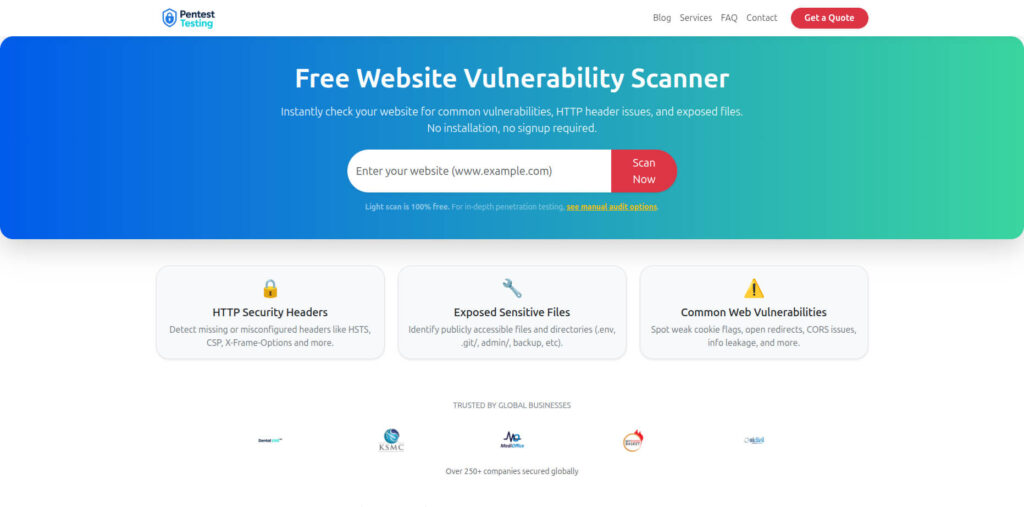
Try the free Website Vulnerability Scanner: https://free.pentesttesting.com/
The Free Website Vulnerability Scanner dashboard screenshot:
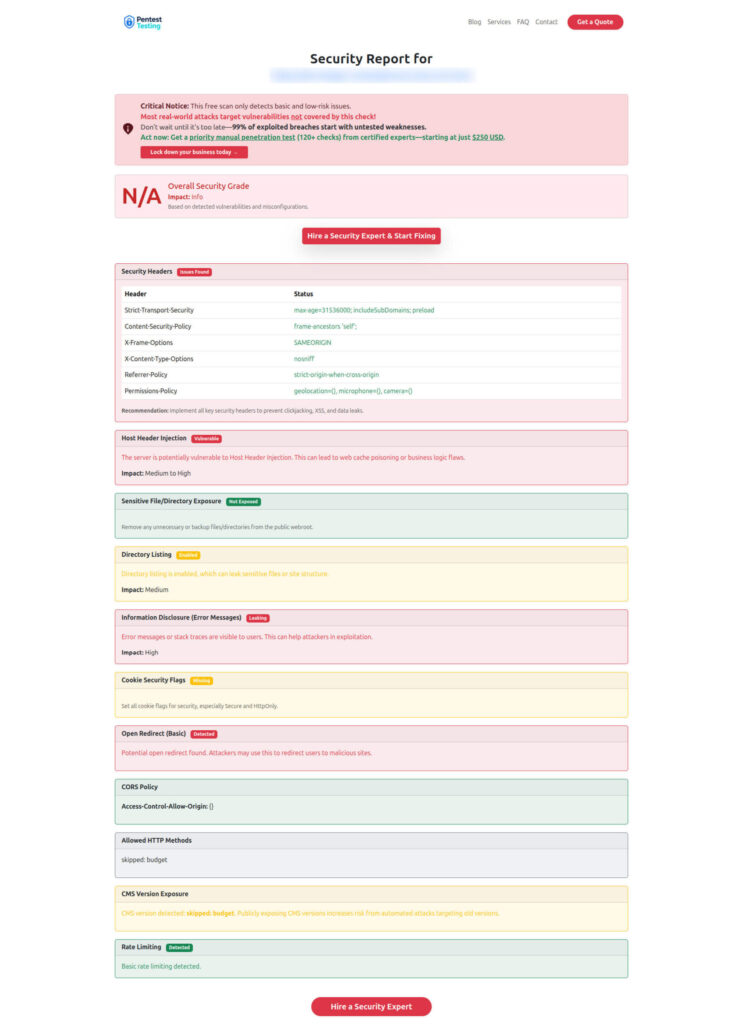
Sample report screenshot to check Website Vulnerability:
A practical checklist (copy/paste for engineering leads)
Cloud-native secrets management baseline:
- Workload identity for apps and CI (no static cloud keys in pods)
- Secrets are service-bound (per app/env/purpose)
- Tokens are short-lived (minutes) and rotated automatically
- Kubernetes RBAC restricts secret reads to named secrets only
- Secrets delivered via files/agents where possible (not env vars)
- CI fetches secrets just-in-time, never stores long-lived prod keys
- Audit logs answer: who/what/when/from where + correlation IDs
- Rotation playbooks are tested (smoke tests + rollback)
- Forensics retention is set for audit logs and key events
When to bring in expert validation (risk, remediation, DFIR)
If you want an external, engineering-focused review of your workload identity security, CI/CD secrets hardening, and secure secret rotation plan:
- Risk Assessment Services: https://www.pentesttesting.com/risk-assessment-services/
- Remediation Services: https://www.pentesttesting.com/remediation-services/
- Digital Forensic Analysis Services: https://www.pentesttesting.com/digital-forensic-analysis-services/
And for a fast self-check:
- Free scanner: https://free.pentesttesting.com/
Related Cyber Rely reads (internal)
- Blog hub: https://www.cybersrely.com/blog/
- Secrets lifecycle patterns: https://www.cybersrely.com/secrets-as-code-patterns/
- Fix a leaked token fast: https://www.cybersrely.com/fix-a-leaked-github-token/
- Forensics-ready CI/CD: https://www.cybersrely.com/forensics-ready-ci-cd-pipeline-steps/
- Forensics-ready telemetry: https://www.cybersrely.com/forensics-ready-telemetry/
- Stop OAuth abuse: https://www.cybersrely.com/oauth-abuse-consent-phishing-playbook/
- Prompt injection fixes (Reprompt): https://www.cybersrely.com/reprompt-url-to-prompt-prompt-injection/
- Supply-chain CI hardening: https://www.cybersrely.com/supply-chain-ci-hardening-2026/
🔐 Frequently Asked Questions (FAQs)
Find answers to commonly asked questions about Cloud-Native Secrets Management.